AI-powered features are no longer a "nice to have" for US businesses — they're becoming the baseline customer expectation. Whether you run an e-commerce store in Atlanta, a SaaS startup in Austin, or a service business anywhere in between, adding a smart assistant to your website can cut support costs, capture more leads, and keep visitors engaged.
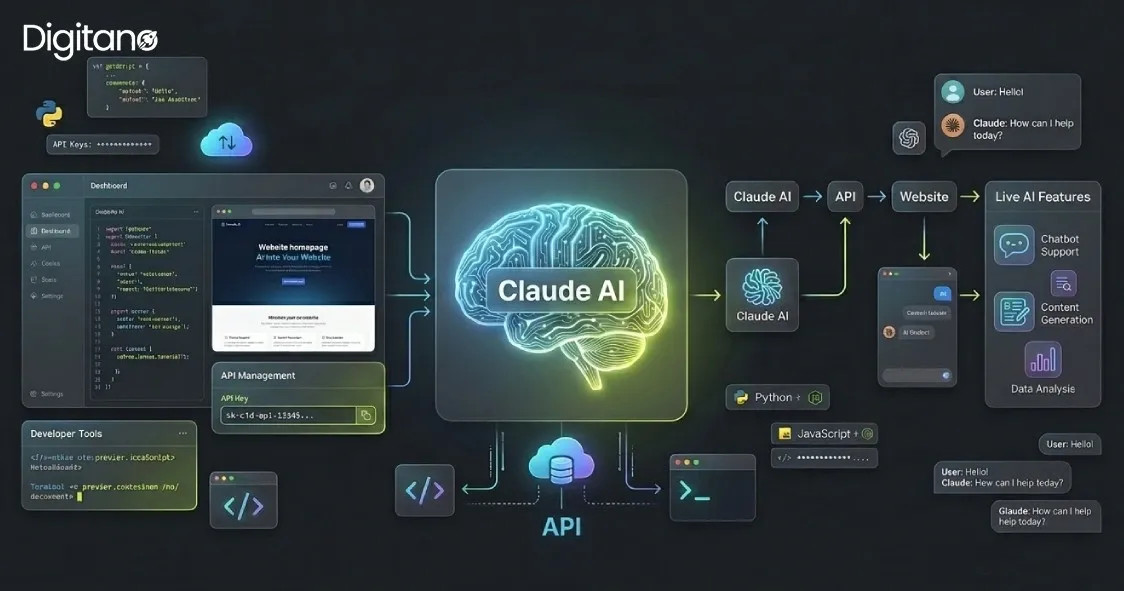
Claude AI, built by Anthropic, is one of the most capable and reliable AI models available for exactly this kind of work. In this guide, we'll walk through how to integrate Claude AI into your website from start to finish — what you'll need, real code you can adapt, what it costs, and the mistakes to avoid.
Quick summary: You integrate Claude by calling Anthropic's API from your server, passing user input to a Claude model, and returning the response to your front end. You'll need an API key, a few lines of backend code, and a plan for keeping that key secure. We'll cover all of it below.
What Is Claude AI (and Why Use It on Your Website)?
Claude is a family of large language models made by Anthropic. It can hold natural conversations, answer questions, summarize documents, write and review code, extract data from text, and power customer-facing chat experiences.
For a website, that translates into practical features like:
- Customer support chatbots that answer FAQs 24/7 and reduce ticket volume
- Lead qualification assistants that ask the right questions before handing off to sales
- Product recommendation helpers for online stores
- Content and search tools that summarize long pages or documentation
- Internal tools like ticket triage, form processing, and data extraction
Compared to building your own model, integrating Claude means you get frontier-level AI without training anything yourself — you simply send text to the API and get intelligent responses back.
What You'll Need Before You Start
Before writing any code, make sure you have these four things in place:
- An Anthropic account and API key. Sign up at the Anthropic Console and generate an API key. Treat this key like a password — anyone who has it can spend money on your account.
- A backend or server environment. Claude should be called from your server (PHP, Node.js, Python, etc.), never directly from the browser. We'll explain why in the security section.
- A payment method on file. The API is pay-as-you-go based on how much text you send and receive. There's no large upfront commitment.
- A clear use case. "Add AI to my site" is too vague. "Answer shipping-policy questions in the chat widget" is specific enough to build and measure.
How Claude API Integration Works (The Big Picture)
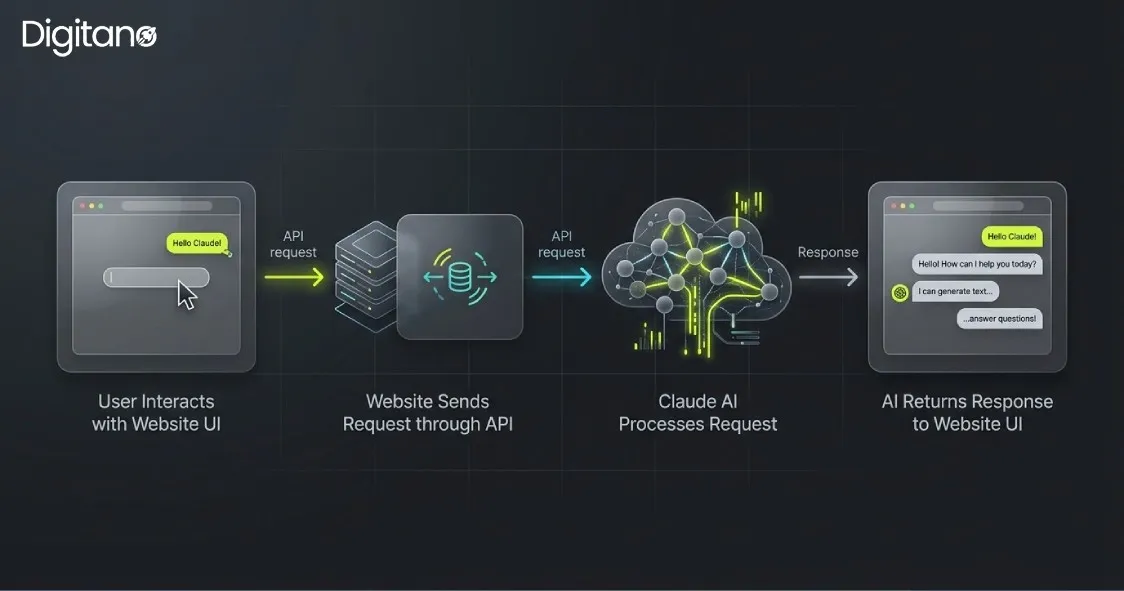
The flow is simpler than most people expect. Every integration follows the same three-step loop:
- Your website's front end collects user input (for example, a message typed into a chat box) and sends it to your server.
- Your server adds your secret API key and forwards the request to Anthropic's API endpoint (
https://api.anthropic.com/v1/messages), specifying which Claude model to use. - Claude returns a response, your server passes it back to the front end, and the user sees the answer.
The key principle: your API key lives on your server and never touches the browser. This keeps it out of reach of anyone inspecting your site's code.
Step-by-Step: Integrating Claude Into Your Website
Below is a practical walkthrough. We'll show a PHP example first (since many US small-business sites run on WordPress and PHP), then a modern JavaScript/Node.js example. Both do the same thing — you only need one.
Step 1: Get and Secure Your API Key
After creating your key in the Anthropic Console, do not paste it directly into your code files. Store it in an environment variable or your server's secrets manager instead. For example, in a .env file that is excluded from version control:
ANTHROPIC_API_KEY=your-key-goes-hereThis single habit prevents the most common and most expensive integration mistake: accidentally publishing your key to a public GitHub repository.
Step 2: Make Your First Call to Claude (PHP)
Here's a clean, minimal PHP function that sends a message to Claude and returns the reply. It uses cURL, which ships with virtually every PHP host.
<?php
 /**
 * Send a single message to Claude and return the text reply.
 *
 * @param string $userMessage The visitor's message.
 * @return string             Claude's response, or a friendly fallback.
 */
function askClaude(string $userMessage): string
{
    $apiKey = getenv('ANTHROPIC_API_KEY');
     $payload = [
        'model'      => 'claude-sonnet-4-6', // fast, cost-effective; see model notes below
        'max_tokens' => 1024,
        'messages'   => [
            ['role' => 'user', 'content' => $userMessage],
        ],
    ];
     $ch = curl_init('https://api.anthropic.com/v1/messages');
    curl_setopt_array($ch, [
        CURLOPT_RETURNTRANSFER => true,
        CURLOPT_POST           => true,
        CURLOPT_HTTPHEADER     => [
            'Content-Type: application/json',
            'x-api-key: ' . $apiKey,
            'anthropic-version: 2023-06-01',
        ],
        CURLOPT_POSTFIELDS     => json_encode($payload),
        CURLOPT_TIMEOUT        => 30,
    ]);
     $response = curl_exec($ch);
     if ($response === false) {
        error_log('Claude request failed: ' . curl_error($ch));
        curl_close($ch);
        return 'Sorry, our assistant is unavailable right now. Please try again shortly.';
    }
     curl_close($ch);
     $data = json_decode($response, true);
     // Claude returns content as an array of blocks; grab the first text block.
    return $data['content'][0]['text']
        ?? 'Sorry, I could not generate a response.';
}
You'd call this from a small endpoint that your chat widget posts to — keeping the key on the server, exactly as intended.
Step 3: The Same Call in JavaScript / Node.js
If your stack is JavaScript or TypeScript, the official SDK makes this even cleaner. Install it first:
npm install @anthropic-ai/sdkThen create a small server-side handler:
import Anthropic from "@anthropic-ai/sdk";  const client = new Anthropic({   apiKey: process.env.ANTHROPIC_API_KEY, // loaded from the environment, never hard-coded });  /**
 * Ask Claude a single question and return the text reply.
 * @param {string} userMessage - The visitor's message.
 * @returns {Promise<string>}
 */ export async function askClaude(userMessage) {   try {     const message = await client.messages.create({       model: "claude-sonnet-4-6",       max_tokens: 1024,       messages: [{ role: "user", content: userMessage }],     });      // content is an array of blocks; return the first text block.     const textBlock = message.content.find((block) => block.type === "text");     return textBlock ? textBlock.text : "Sorry, I could not generate a response.";   } catch (error) {     console.error("Claude request failed:", error);     return "Sorry, our assistant is unavailable right now. Please try again shortly.";   } }
Step 4: Give Claude Context With a System Prompt
Out of the box, Claude is a general assistant. To make it your assistant, add a system prompt — instructions that tell Claude who it is, what it knows, and how to behave. This is where you turn a generic model into a branded, on-topic helper.
const message = await client.messages.create({ model: "claude-sonnet-4-6", max_tokens: 1024, system: "You are the friendly support assistant for Acme Co., a US-based online " + "furniture store. Answer only questions about our products, shipping, and " + "returns. Keep replies short and warm. If you don't know something, tell " + "the customer to email support@acme.co. Never make up prices or policies.", messages: [{ role: "user", content: userMessage }], });A good system prompt is the single biggest lever you have over response quality. Be specific about scope, tone, and what Claude should do when it doesn't know an answer.
Step 5: Handle Multi-Turn Conversations
Claude has no memory between requests, so for a real chat experience you send the entire conversation history each time. Keep an array of messages and append to it:
const conversation = [ { role: "user", content: "Do you ship to California?" }, { role: "assistant", content: "Yes! We ship to all 50 states." }, { role: "user", content: "How long does it take?" }, // Claude sees the full thread ]; const message = await client.messages.create({ model: "claude-sonnet-4-6", max_tokens: 1024, messages: conversation, });Step 6: Connect It to Your Front End
Finally, wire a simple chat UI to your server endpoint. The browser sends the user's message to your server (not to Anthropic directly), your server calls Claude, and the reply comes back. This keeps your API key safe and lets you add rate limiting, logging, and validation in one place.
Which Claude Model Should You Choose?
Anthropic offers several models at different speed and price points. For most website integrations, you're choosing between speed/cost and raw capability. As of 2026, common choices include:
- Claude Sonnet 5 — the best balance of speed, intelligence, and cost for high-volume, customer-facing features like chatbots. This is the right default for most websites.
- Claude Haiku 4.5 — the fastest and most cost-effective option, ideal for simple, high-frequency tasks like short FAQ answers or classification.
- Claude Opus 4.8 — the most capable model, suited to complex reasoning, long documents, and premium knowledge-work features where quality matters more than cost.
A practical strategy: start with a mid-tier model, measure real response quality, and only move up if you need to. You can change models by swapping a single string in your code, so it's easy to experiment.
Model names, IDs, and pricing change over time. Always confirm the current lineup and rates on Anthropic's official pricing page before you launch.
How Much Does It Cost to Integrate Claude AI?
Claude's API is usage-based — you pay per million tokens (roughly, chunks of text) sent and received, not a flat monthly fee. Costs depend on three things:
- Which model you use — faster models cost less per token; the most capable models cost more.
- How much text you send — longer system prompts and conversation histories increase input tokens.
- How long the responses are — controlled by your
max_tokenssetting.
For a typical small-business support chatbot using a mid-tier model, costs are usually modest — often a few cents per conversation. You can also reduce costs significantly with features like prompt caching (up to major savings on repeated context) and batch processing (50% off for non-urgent bulk jobs). Set a monthly spend limit in the Anthropic Console so there are no surprises.
Security Best Practices (Don't Skip This)
Getting AI integration wrong can be costly. Follow these rules from day one:
- Never expose your API key in front-end code. If it's in your JavaScript that ships to the browser, it's public. Always call Claude from your server.
- Use environment variables or a secrets manager — never hard-code keys in files you commit to Git.
- Add rate limiting on your endpoint so one user (or a bot) can't rack up huge bills.
- Validate and sanitize user input before sending it on, and set a sensible
max_tokensceiling. - Set a monthly budget cap in the Anthropic Console as a safety net.
- Log requests server-side so you can debug issues and monitor for abuse.
Common Use Cases for US Businesses
Here's how different types of US businesses are putting Claude to work on their sites:
- E-commerce: product Q&A, order-status help, and return-policy questions — reducing support tickets during busy seasons like Black Friday.
- Professional services (law, accounting, real estate): intake assistants that qualify leads and answer common questions before a human follows up.
- SaaS companies: in-app help, onboarding guidance, and documentation search.
- Healthcare and wellness: appointment FAQs and general information (with a human handoff for anything requiring professional advice).
- Local service businesses: 24/7 answers to "Are you open?", "Do you serve my area?", and quote requests — capturing leads outside business hours.
Frequently Asked Questions
Q1: Do I need to be a developer to integrate Claude AI into my website?
For a custom integration, you'll need some development experience or a partner who has it. If you're on a platform like WordPress or Shopify, plugins and no-code tools can help — but a custom build gives you the most control over behavior, branding, and cost.
Q2: Can I add Claude to a WordPress site?
Yes. You can build a small PHP integration (like the example above) into a custom plugin or theme, or use an existing plugin that connects to the Anthropic API with your key.
Q3: Is Claude AI free to use on my website?
The API is pay-as-you-go, not free, but costs are typically low for small to mid-sized sites, and you can cap your monthly spend. There's no large upfront commitment.
Q4: How long does integration take?
A basic chatbot can be up and running in a day or two. A polished, production-ready integration with custom context, security hardening, and UI work typically takes longer, depending on complexity.
Q5: Is my data safe with Claude?
Anthropic publishes its data-handling and privacy policies, and offers options like US-only inference for workloads that need to stay in the US. Always review Anthropic's current terms and choose settings that match your compliance needs.
Ready to Add Claude AI to Your Website?
Integrating Claude can transform a static website into an interactive experience that supports customers, captures leads, and saves your team hours every week. The technical steps are straightforward — but getting the system prompt, security, model choice, and user experience right is where a professional integration pays for itself.
At Digitano LLC, we build custom AI integrations, web applications, and digital solutions for businesses across the US. If you'd like to add Claude AI to your website the right way — secure, reliable, and tuned to your brand — get in touch with our team for a free consultation.