Let me ask you something. When was the last time you waited on hold for 20 minutes just to ask a simple question? Pretty frustrating, right? Now imagine your own customers feeling that way every single day.
That is exactly the problem AI chatbots solve. And in 2025 and 2026, they are not just a "nice-to-have" anymore. They have become a serious business tool that companies of all sizes are using to save money, serve customers better, and grow faster.
In this guide, I am going to walk you through everything you need to know about building a custom AI chatbot for your business. We will look at real examples from companies you have heard of like Klarna, H&M, and Domino's and I will keep things simple and easy to understand. No confusing tech jargon. Just straight talk.
Let's get into it.
1. The Big Picture: Where AI Chatbots Stand in 2025 and 2026
The growth of AI chatbots has been nothing short of remarkable. A few years ago, most chatbots were clunky, robotic, and honestly pretty useless. They would give you the same canned response no matter what you asked. People hated them.
But everything changed when large language models (LLMs) like GPT-5, Claude, and Gemini arrived. Suddenly, chatbots could hold real conversations, understand context, and give genuinely helpful answers. Businesses noticed fast.
That is not a niche trend. That is a full market transformation. And businesses that are still making customers wait on hold or dig through outdated FAQ pages are already falling behind.
2. Real Companies. Real Results. (The Examples That Actually Prove This Works)
I know what you might be thinking: "Sure, this sounds great in theory. But does it actually work for real businesses?" Great question. Let's look at what real companies did and what happened.
See the pattern? In every single case, the chatbot did not replace the business, it made the business better. Faster, cheaper, more available, and in some cases like Duolingo, more valuable to the customer.
3. What Kind of Chatbot Do You Actually Need?
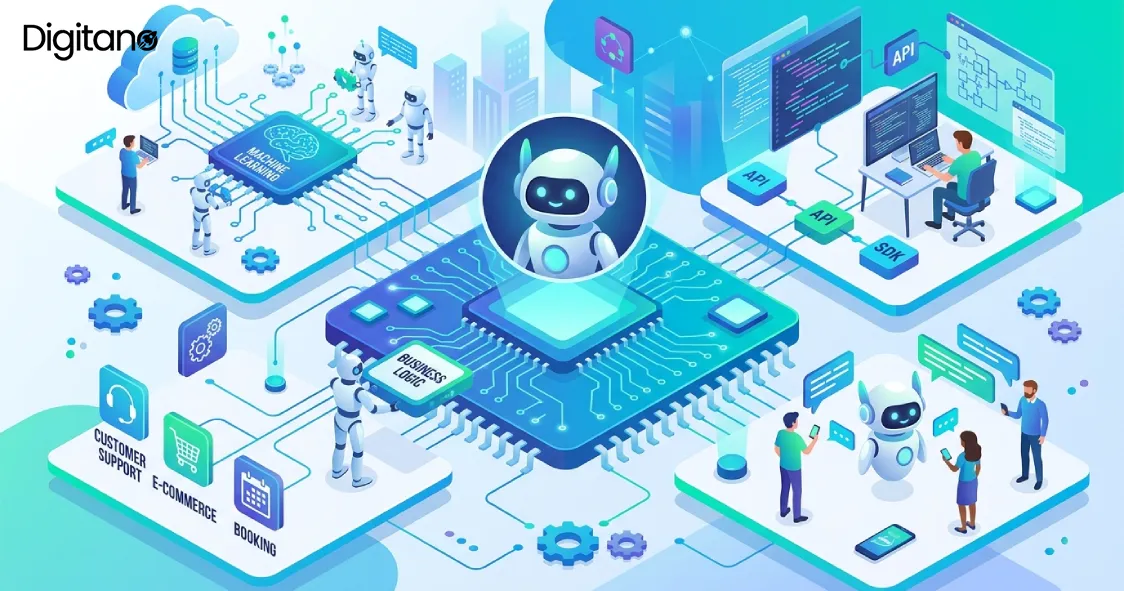
Not all chatbots are the same. Before you start building, you need to know which type fits your business. Here are the three main types in plain English.
Type 1: Rule-Based Chatbots (The Old School Way)
These bots follow a fixed script. They work like a decision tree: if the customer says X, reply with Y. They are simple, predictable, and cheap. But they break the moment a customer says something unexpected. Think of the old 'Press 1 for billing, Press 2 for support' phone menus, same idea, just in text.
Best for: Very simple, repetitive tasks. A pizza order bot with a fixed menu. An appointment booking system with limited options.
Type 2: AI-Powered Chatbots (The Smart Way)
These use large language models to understand what a customer actually means, not just what keywords they typed. They can handle spelling mistakes, slang, multiple languages, and unexpected questions. This is what Klarna, H&M, and Duolingo are using. They are much more powerful and feel far more natural to use.
Best for: Customer support, sales assistance, product recommendations, lead generation, complex queries.
Type 3: RAG-Powered Chatbots (The Expert Way)
RAG stands for Retrieval-Augmented Generation. This is a technique where the chatbot can look through your own documents, manuals, policies, and databases in real time before answering. So instead of relying only on what the AI was trained on, it pulls the latest, most accurate information from your own systems. This is the gold standard for business chatbots in 2025 and 2026.
Best for: Any business with complex, specific knowledge. Law firms, hospitals, banks, SaaS companies with detailed product docs, HR departments with policy manuals.
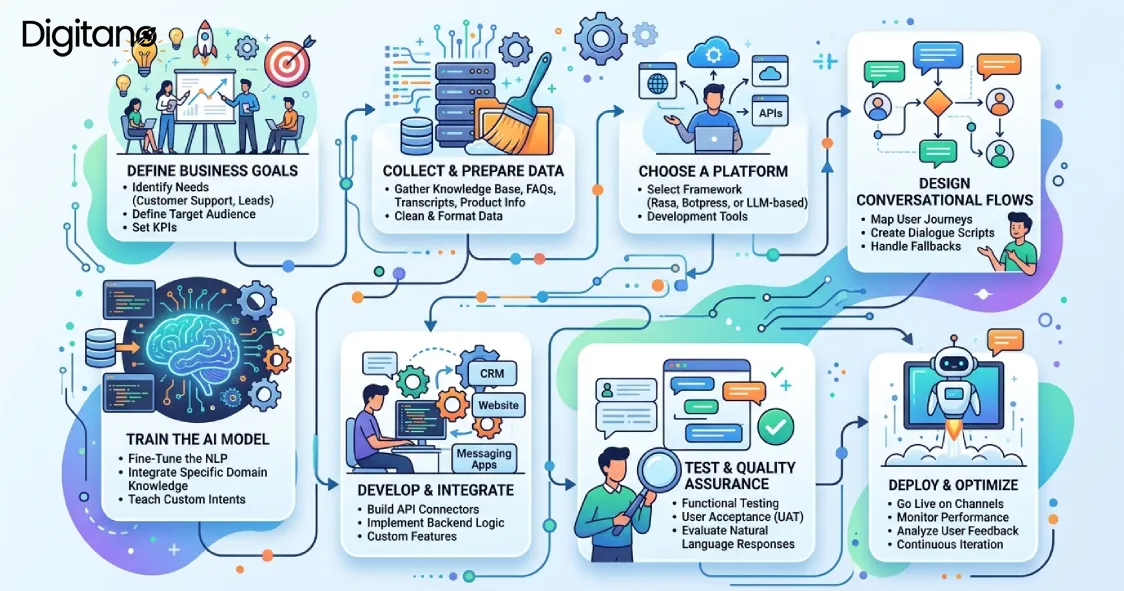
4. How to Build Your AI Chatbot: Step-by-Step
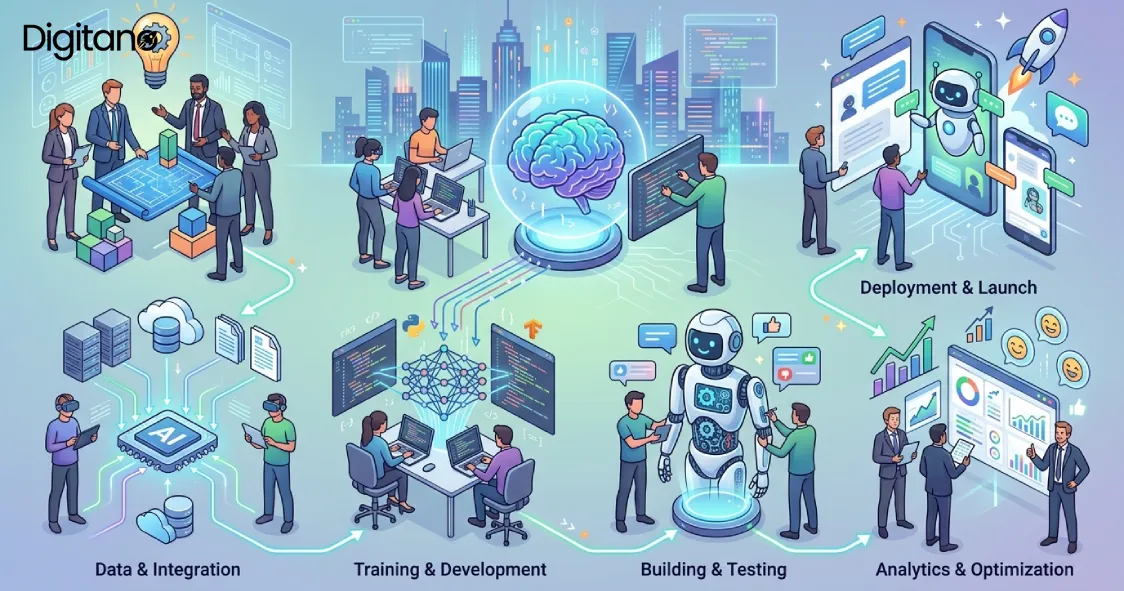
Alright, let's get practical. Here is exactly how you build a custom AI chatbot for your business, from idea to live product.
Step 1: Define the Problem First
The biggest mistake businesses make is starting with the technology and working backwards. Do not do that. Start with one clear question: What specific problem do I want this chatbot to solve?
Is it reducing the number of support tickets? Helping customers find the right product? Booking appointments automatically? The more specific you are, the better your chatbot will be. A chatbot that does one thing brilliantly is worth ten times more than one that tries to do everything and does nothing well.
Step 2: Choose Your AI Model
In 2025 and 2026, you do not build an AI from scratch. You use one of the existing large language models and build on top of it. Here are your main options.
For most businesses, the choice comes down to Claude API or OpenAI GPT-4o for the AI brain, combined with a RAG framework like LangChain to connect it to your own data. That is the setup used by the majority of the successful examples we looked at earlier.
Step 3: Collect and Prepare Your Data
Your chatbot is only as good as the information you give it. You need to collect and clean all the knowledge you want it to have. This typically includes:
- Your product or service documentation
- Your FAQ pages and support articles
- Past customer support tickets and resolutions
- Your company policies (returns, shipping, cancellations)
- Any internal manuals or guides relevant to customer questions
Once you have this content, you convert it into a searchable format using a process called embedding, which turns your text into a format the AI can search through quickly and accurately. This is stored in a vector database.
Step 4: Build the Backend
The backend is the engine room of your chatbot. This is where the actual logic lives. In simple terms, when a user sends a message, your backend does the following:
- Receives the user's message
- Searches your vector database for the most relevant information
- Sends both the message AND the relevant info to the AI model
- Gets back a smart, accurate response
- Returns that response to the user in under 2 seconds
This is typically built using Node.js, Python, or PHP. The choice of language depends on your existing tech stack. All three work well for this purpose.
Step 5: Build the Chat Interface
This is what your users actually see and type into. Options range from a simple floating chat widget on your website to a full mobile app. In 2025, most businesses start with a web widget and expand from there. The chat interface should feel fast, natural, and match your brand. Users abandon slow chatbots within seconds.
Step 6: Add Escalation to a Human Agent
This step is non-negotiable. Every single chatbot, no matter how smart, needs a clean way to pass the conversation to a human when needed. This is called the handoff. It should happen automatically when the bot is not confident in its answer, or when a customer specifically asks to speak to a person.
Businesses that skip this step see their customer satisfaction scores drop. Nobody wants to feel trapped talking to a robot that cannot solve their problem.
Step 7: Test Like Your Business Depends on It (Because It Does)
Before going live, test hundreds of real scenarios. Try to break it. Ask off-topic questions. Misspell words. Ask in different languages. Ask emotionally charged questions like an angry customer would. Every edge case you find and fix before launch is one fewer frustrated customer after launch.
Step 8: Deploy, Monitor, and Keep Improving
Going live is not the finish line. It is actually the starting line. Once your chatbot is live, you need to watch it closely. Which questions is it getting wrong? Where are users dropping off? What are customers asking that you did not expect? The best chatbots in 2025 and 2026 are the ones that get better every single week based on real data from real conversations.
5. How Much Does It Cost and How Long Does It Take?
These are the two questions I get asked most often. Here is an honest breakdown.
The costs above are for development. On top of that, you will pay for the LLM API usage. For a business handling 10,000 conversations per month using Claude or GPT-4o, expect to pay roughly $300 to $800 per month in API costs depending on conversation length. That is still dramatically cheaper than the equivalent human support cost.
6. The Most Common Mistakes (And How to Avoid Them)
I have seen a lot of chatbot projects fail. Not because AI does not work, but because of completely avoidable mistakes. Here are the big ones.
- Trying to build everything at once. Pick one use case. Master it. Then expand. Scope creep kills chatbot projects.
- Skipping conversation design. AI is not magic. You still need to think about how conversations should flow. What should the bot say when it does not know something? What tone should it use?
- Not connecting to real data. A chatbot that gives generic answers is useless. It needs to know your actual products, prices, and policies.
- Ignoring the human handoff. This one alone accounts for the majority of bad chatbot reviews.
- Building it and forgetting it. The best chatbots are maintained and improved monthly. Treating it like a one-and-done project is a recipe for failure.
- Not testing with real users. Developers test chatbots like developers. Real customers ask very different questions. Always run a beta with actual users before full launch.
7. What Changed From 2025 to 2026: The Biggest Trends
AI moves fast. Here is what specifically changed between 2025 and 2026 that you need to know about.
Voice-First Chatbots
In 2025, most chatbots were text-only. By 2026, voice-enabled chatbots are becoming standard. Businesses are integrating AI assistants into phone systems so that the same intelligence that powers your chat widget also answers your phone calls without a call centre.
Multimodal Chatbots
In 2026, chatbots can now look at images. A customer can take a photo of a broken product and the bot can identify it, pull up the warranty information, and start a return all without the customer typing a single word of description. This is called multimodal AI and it is changing customer service dramatically.
Proactive Chatbots
Old chatbots waited for the customer to ask. New ones in 2026 reach out first. If a customer has been sitting on a checkout page for 3 minutes without completing the purchase, the chatbot pops up and says 'Need help picking a size?' or 'Want me to apply a discount code?'. This proactive approach is increasing conversion rates by 15–25% for early adopters.
Agentic AI
This is the big one for 2026. Agentic AI means the chatbot does not just answer questions, it takes actions. It can book a meeting in your calendar, process a refund, update an address in your CRM, send a follow-up email, and file a support ticket, all in one conversation. This goes far beyond answering FAQs. It is a digital employee.
8. Frequently Asked Questions
Q1: Do I need a technical team to build an AI chatbot?
Q2: Will the chatbot give wrong answers to my customers?
Q3: How do I make sure customer data is safe?
Q4: Can a chatbot handle multiple languages?
Q5: How long before I see a return on my investment?
Q6: What is the difference between a chatbot and an AI agent?
Q7: Should I build my own chatbot or use an existing platform?
Final Thoughts: Your Next Step
Here is the honest truth about AI chatbots in 2025 and 2026. Technology is no longer the hard part. It is accessible, affordable, and it works. The hard part is making the decision to start, defining the right use case, and building something that is actually useful for your customers, not just impressive in a demo.
Klarna did not build a chatbot because it was trendy. They built it because they had millions of customers who needed fast answers and a support cost that was getting out of hand. H&M did not build one to impress investors. They built it because their customers were asking the same size and return questions thousands of times a day.
What is the version of that problem in your business? What question does your team answer over and over again? What task could be handled faster and cheaper if it did not require a human every time?
Start there. Build something small that solves that one problem really well. Measure it. Improve it. Then expand.
The businesses that start now will have a six to twelve month head start on the ones that wait until everything is 'perfect'. In a space that moves as fast as AI, that head start matters more than almost anything else.