Let's be honest for a second. Managing a remote or hybrid team is hard. Not the work itself, the visibility. When your team is spread across different cities, time zones, or even just working from home, how do you actually know what is getting done, who is on track, and where the bottlenecks are?
Most managers resort to one of two extremes. Either they micromanage sending constant check-in messages, demanding updates every hour, creating an anxious and unproductive work environment. Or they go hands-off entirely and hope for the best, only to discover problems weeks later when a deadline is missed or a client is unhappy.
There is a better way. And it does not involve either extreme.
Digitano is a purpose-built employee tracking system designed for the way modern teams actually work. It tracks working time, break time, and idle periods automatically. It gives employees a personal dashboard where they can see their own stats, request manual log corrections, and manage their leave all from one clean, simple interface. And it does all of this with privacy-first, encrypted screenshot technology that gives managers the visibility they need without turning every employee into a surveillance subject.
In this guide, we are going to walk through everything Digitano does, why it matters in 2025 and 2026, what the real-world research says about employee monitoring done right, and how Digitano compares to the other major tools on the market. No fluff. Just the real picture.
1. Why Employee Time Tracking Matters More Than Ever in 2025 and 2026
The shift to remote and hybrid work that began in 2020 is now permanent for a significant portion of the global workforce. This is not a temporary experiment anymore. It is the baseline reality for hundreds of millions of workers and the companies that employ them.
With that shift came a genuine management challenge that most organisations are still figuring out. Traditional management relied heavily on physical presence. You could see who was at their desk, who was in the building, who seemed busy and who seemed distracted. That visibility is gone for remote teams. And simply trusting everyone without any accountability structure creates its own set of problems.
Here is the thing that surprises most managers when they first implement a tracking system: employees often like it more than they expected. Not because they enjoy being watched, but because clear time tracking removes the ambiguity that causes stress. When you know what counts as work time, when breaks are officially recognised, and when your hours are accurately logged, you are not spending mental energy worrying about whether you are doing enough. The system handles that clarity for you.
But this is a big but employee tracking only delivers these benefits when it is done the right way. Heavy-handed surveillance, invasive screenshot capture without encryption, and systems that feel punitive rather than supportive destroy morale and trust faster than any other management decision. The approach matters as much as the technology.
2. Inside Digitano: A Walk Through Every Feature
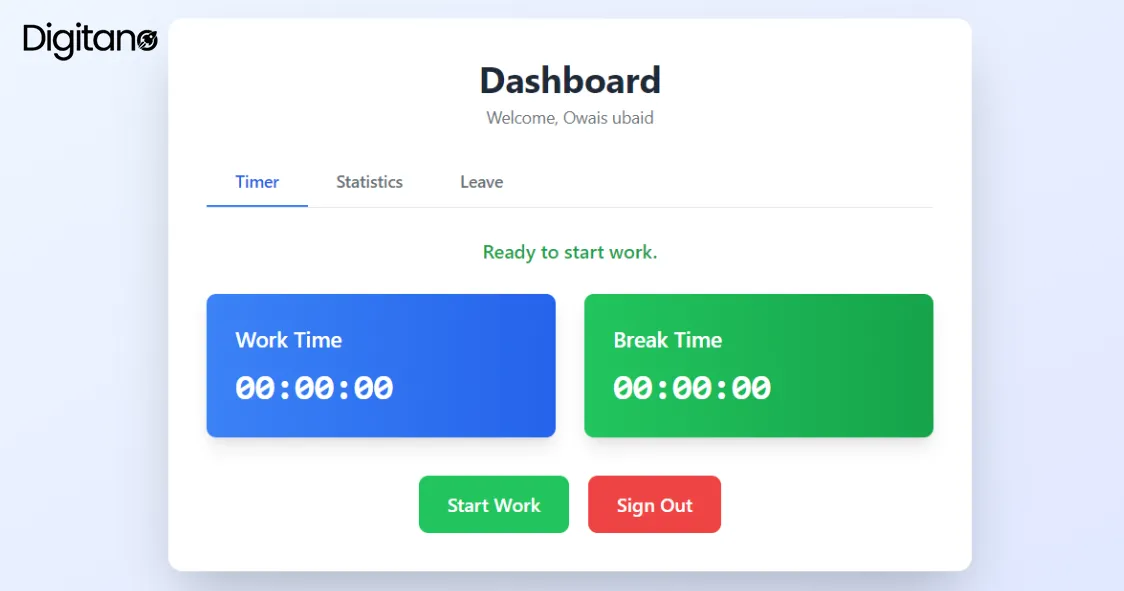
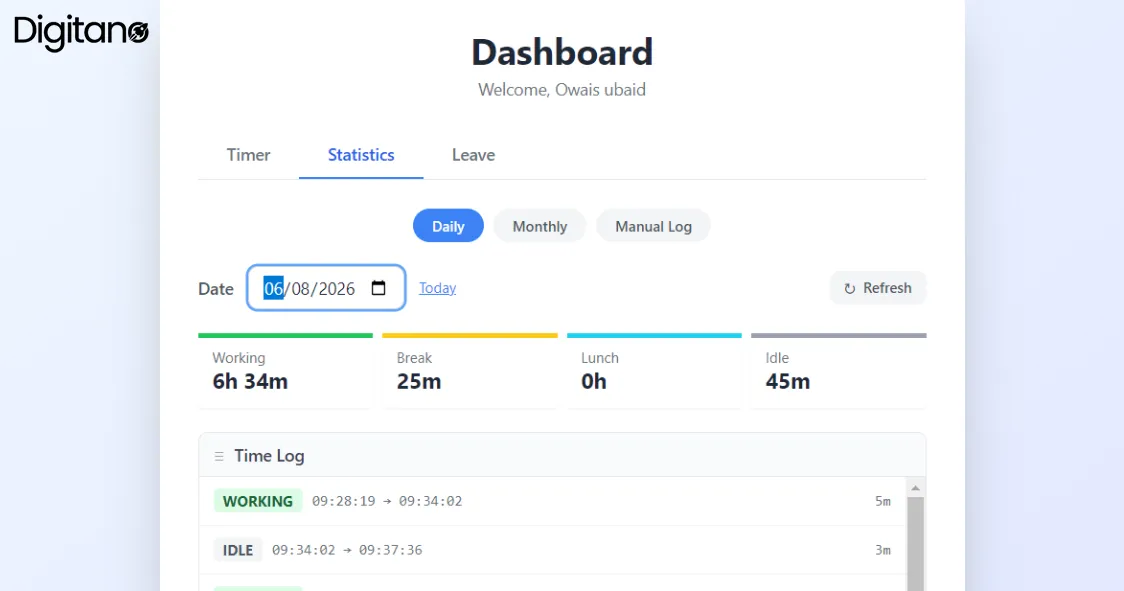
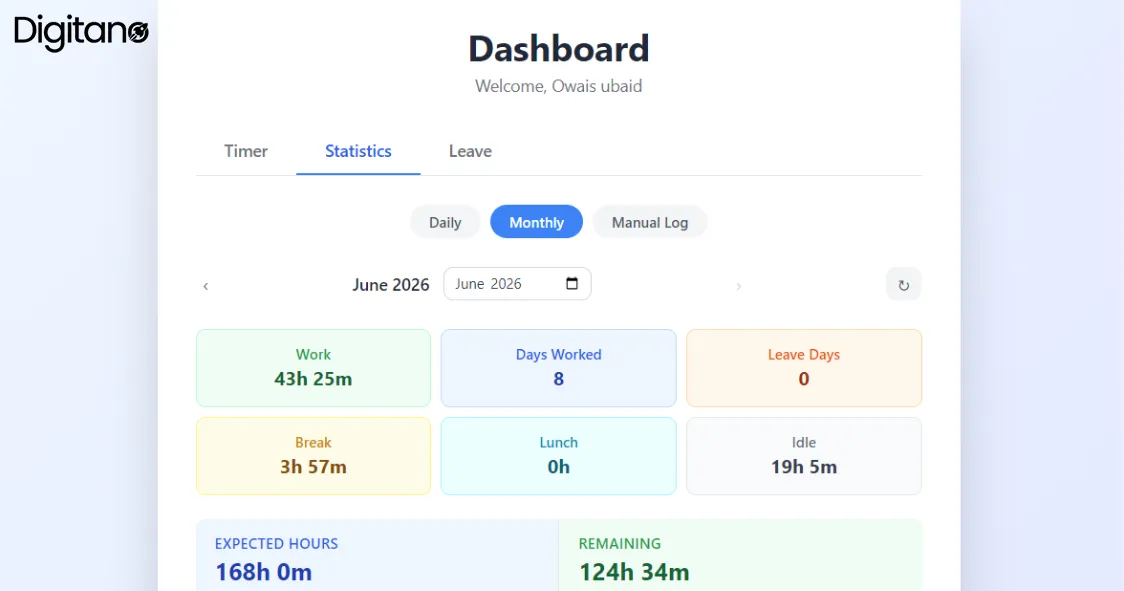
Digitano's employee-facing dashboard is organised around three core areas: Timer, Statistics, and Leave. Each is designed to give employees complete visibility into their own working day, while giving managers the accurate, reliable data they need. Let's walk through each one.
3. The Encrypted Screenshot Feature: Visibility Without Invasion
The phrase 'employee monitoring software' makes a lot of people uncomfortable and honestly, for good reason. There is a long history of poorly designed monitoring tools that treated employees like suspects: capturing every click, recording every keystroke, and storing screenshots in ways that exposed personal and sensitive information to managers who had no legitimate need to see it.
Digitano takes a fundamentally different approach with its encrypted screenshot feature. Here is how it works, and why the distinction matters.
What Encrypted Screenshots Actually Mean
When Digitano captures a screenshot during an employee's working session, that image is encrypted before it is transmitted or stored. This means that the raw screenshot is never in plain text anywhere it should not be. Only authorised administrators with the right access credentials can view the images and even then, access is logged and controlled. An employee's screen is not being broadcast live to anyone who happens to be in the admin panel. It is a captured, encrypted record accessible only through a controlled, audited process.
This is not just a nice-to-have feature. In many jurisdictions, employee monitoring legislation including GDPR in Europe, PDPA requirements in parts of Asia, and various state-level privacy laws in the US requires that any monitoring of employee activity be proportionate, transparent, and secure. Encrypted screenshots satisfy the security requirement. Combined with transparent disclosure to employees that monitoring is in place, Digitano's approach is designed to be legally compliant in the markets where its clients operate.
Why This Matters for Trust
There is a paradox at the heart of employee monitoring. Heavy surveillance destroys the trust that makes teams productive. But zero accountability creates the conditions where poor performance goes unaddressed and high performers feel unfairly treated because everyone is held to the same non-standard. The right amount of monitoring, transparent, proportionate, and secure actually builds trust rather than eroding it.
When employees know that screenshots are encrypted and only accessible to authorised admins for legitimate work purposes, the monitoring feels less invasive. When they know the data is used for accountability rather than nitpicking their screen content, they are less anxious about it. And when they have their own full view of their working stats in their personal dashboard, the relationship between monitoring and fairness becomes clear: the same system that records their hours is the same system that proves those hours when payroll time comes.
Idle Time Detection: The Smarter Alternative to Constant Screenshots
One of Digitano's most important features is automatic idle time detection. Rather than relying entirely on periodic screenshots to determine if someone is working, the system detects when keyboard and mouse activity stops for a meaningful period and automatically switches the time classification from Working to Idle. This means that the screenshot burden is reduced and the system does not need to capture images constantly to determine whether someone is at their computer. The activity detection handles that in the background, and screenshots serve as a verification layer rather than the primary monitoring mechanism. This approach is both more accurate and less invasive than screenshot-only systems.
4. How Real Businesses Use Employee Tracking Systems Like Digitano
Let's look at how different types of organisations are using workforce monitoring tools in 2025 and 2026 and what the outcomes look like when it is done well.
Digital Agencies and Content Teams
Digital agencies, marketing firms, content studios, SEO companies, and development shops were early adopters of time tracking software because they bill clients by the hour. Accurate time tracking is not just an internal management tool; it is the foundation of accurate client invoicing. A missed hour here, an unlogged meeting there, and a month's worth of client work is under-invoiced. For these teams, a tool like Digitano that automatically captures working time, break time, and idle periods without relying on employees to remember to start and stop timers is directly tied to revenue accuracy.
Research from the Project Management Institute in 2025 found that organisations with automated time tracking billed an average of 11% more billable hours than those relying on manual timesheets simply because the automated system captured time that employees forgot to log manually.
Remote Development Teams
Software development teams working across time zones face a particular accountability challenge. Stand-up meetings and pull request reviews provide some visibility, but they do not tell the full story of where time is going. Senior engineers report spending 20 to 30% of their week on non-coding tasks: code reviews, planning meetings, documentation, debugging sessions that are difficult to track accurately without a dedicated system. Digitano's automatic working and idle time detection gives development managers accurate data about where engineering time is actually going, without requiring developers to manually log every activity category.
BPO and Customer Support Operations
Business process outsourcing firms and customer support centres were among the first industries to adopt screenshot-based monitoring, because the accountability requirements in these environments are very high. Clients paying for a certain number of agent hours per month need to know those hours are being worked. The challenge with early-generation monitoring tools was that screenshot capture without encryption created serious data security risks. Support agents often have sensitive customer information on their screens, and unencrypted screenshots of those screens represent a real compliance and liability risk. Digitano's encrypted screenshot approach directly addresses this concern: the monitoring capability is preserved, but the security risk of unencrypted image storage is eliminated.
Educational Technology and E-Learning Companies
A growing category in 2025 and 2026 is EdTech companies and online course platforms, which employ large numbers of content creators, curriculum developers, and learning designers working remotely. These roles are highly creative and do not fit neatly into traditional productivity metrics. Digitano's approach of tracking time accurately, flagging idle periods, and giving employees full visibility into their own data works well here because it measures commitment and availability rather than trying to quantify creative output. A curriculum designer who spent three hours deeply focused on a lesson structure looks exactly the same in Digitano's working time log as one who spent the same three hours doing something else; the difference shows up in the actual deliverable, not in the tracking data.
5. Digitano vs. The Competition: Full Feature Comparison
How does Digitano stack up against the most widely used alternatives in the employee time tracking and monitoring space? Here is an honest, feature-by-feature breakdown. The green highlights show where Digitano has native built-in capabilities that competing tools either lack entirely or handle only partially.
The standout differentiators in this comparison are the features that competing tools simply do not have: the Manual Log Request system with admin approval workflow, the built-in Leave Management with urgent and half-day flags, and the regional Holiday Tracking. Most competing tools are pure time trackers that tell you when someone was working but do not provide the HR-adjacent features that make Digitano a complete workforce management tool. For businesses that would otherwise need a separate HR system alongside their time tracking tool, Digitano's integrated approach represents a significant operational simplification.
6. What Changed in Workforce Monitoring From 2025 to 2026
The Privacy Legislation Wave of 2025
2025 was the year that workforce monitoring legislation caught up with practice. Multiple new privacy regulations came into effect across different markets extending and strengthening the requirements for transparent, proportionate, and secure employee monitoring. In the UK, updated ICO guidance clarified that employers must inform employees about monitoring in specific terms, document their monitoring policy, and ensure that any data collected is stored securely and used only for stated purposes. In several US states, new legislation imposed specific requirements on screenshot-based monitoring tools. Digitano's encrypted screenshot approach and transparent employee-facing dashboard were already aligned with these emerging requirements but many competing tools scrambled to add encryption and disclosure features they had not previously prioritised.
The Hybrid Work Normalisation
By 2025, the debate about whether remote work was temporary or permanent was settled. It is permanent, at least for a significant portion of the knowledge economy. With that settlement came a maturation in how companies approach remote workforce management. The 'trust everyone completely with no structure' phase of 2021 and 2022 gave way to a more nuanced approach: structured accountability that respects employee autonomy while providing the visibility managers need to do their jobs. Digitano's design of automatic tracking without micromanagement, employee self-service for corrections and leave, full data transparency for the employee is precisely aligned with this mature approach.
AI-Powered Insights Became Standard in 2026
By 2026, the leading workforce monitoring platforms are using AI to surface insights from time tracking data that would be invisible to human reviewers looking at raw logs. Pattern recognition that identifies when a team member's idle time increases significantly over a period potentially indicating disengagement before it becomes a performance issue. Automatic categorisation of working time into different activity types based on screenshot analysis. Predictive capacity planning that uses historical working time data to forecast when teams will hit overtime risk before it happens. Digitano's data architecture capturing precise, timestamped activity logs with working, break, idle, and lunch classifications provides exactly the structured data foundation that these AI analysis layers require.
The Manual Log Problem Got Bigger
One issue that became more significant through 2025 and into 2026 is the manual log gap. What happens when employees genuinely work hours that the tracking system does not capture? Internet outages, travel, client meetings, system failures. Most tracking tools handle this poorly: either they have no mechanism for employees to report untracked time, or they have a simple free-form request that gives managers no structured way to evaluate and approve it. Digitano's Manual Log Request feature with structured fields for date, hours, and reason, plus a full admin approval workflow and request history was ahead of this problem. As the issue has grown in importance, the feature has become one of the most valued by Digitano's users.
7. Who Is Digitano Built For?
Digitano is not a one-size-fits-all tool. Here is an honest breakdown of where it fits best and where alternative approaches might make more sense.
Digitano is an excellent fit for:
- Remote and hybrid teams that need accurate, automatic time tracking without relying on employees to manually log every activity
- Businesses that bill clients by the hour and need reliable, auditable time records to support accurate invoicing
- Organisations with privacy and compliance requirements where unencrypted screenshot storage creates legal or reputational risk
- Companies that manage leave and time tracking separately today and want to bring both into one unified system
- Managers who want visibility without micromanagement Digitano gives you the data you need without requiring you to watch every minute
- Teams where manual log corrections are a regular issue field workers, travelling staff, or employees in areas with unreliable internet
You might need a different approach if:
- You manage a fully on-site team where physical presence is visible and time tracking adds overhead without adding insight
- You need deep project-level time tracking with budget burn rates and client-specific time allocation tools like Harvest or Toggl Track are more specialised for this use case
- Your team is smaller than five people and informal check-ins provide sufficient accountability without a dedicated system
8. Frequently Asked Questions About Digitano
Q1: Is Digitano suitable for remote teams working across different time zones?
A: Yes, Digitano is designed specifically for distributed and remote teams. The tracking system is based on each employee's local working session, so time zones do not interfere with accurate logging. The Monthly Statistics view shows each employee's hours against their expected hours for the month, which can be configured per employee based on their local working schedule. The Leave Management system handles leave requests asynchronously employees submit requests which managers can review and approve on their own schedule, regardless of the time difference.
Q2: How does Digitano handle situations where an employee forgets to start the timer?
A: This is exactly what the Manual Log Request feature is built for. If an employee worked a session they forgot to track or could not track due to a technical issue, internet outage, or working from a location without the app they can submit a Manual Log Request specifying the date, the number of hours worked, and a written explanation. The request goes to an admin for review. The admin can approve it (adding the hours to the employee's record) or reject it with a written reason. The employee can see all their requests and their status at any time in the My Requests section.
Q3: What does 'Idle Time' mean in Digitano and how is it detected?
A: Idle time is the period during a working session when the system detects no keyboard or mouse activity for a sustained period. This might be because the employee stepped away from their computer without hitting 'Take Break', or because they were reading something on screen without interacting with it. Digitano automatically classifies these periods as Idle rather than Working, giving a more accurate picture of genuine productive time versus time when the computer was open but not actively being used. Idle time is clearly visible in both the Daily Statistics time log and the Monthly summary, labelled separately from Working time so that managers and employees can see the distinction clearly.
Q4: How does the encrypted screenshot feature work and who can see the screenshots?
A: When Digitano captures a screenshot during a working session, the image is encrypted before it is stored or transmitted. Only authorised administrators with the appropriate access credentials can view screenshots, and access is controlled and logged. Employees are informed that screenshot monitoring is in place as part of the system's transparency commitment. The encryption means that screenshots are never accessible in plain text to anyone who should not see them protecting sensitive work content, client data, and personal information that might appear on an employee's screen during a legitimate working session.
Q5: Can employees apply for half-day leave in Digitano?
A: Yes, the Leave Management system includes a Half Day checkbox option on the leave application form. When selected, the system records the leave as a half-day rather than a full day, and the End Date calculation adjusts accordingly. Employees can also mark a leave request as Urgent using a separate checkbox, which flags the application for priority review by the admin. All leave applications including their type, dates, reason, and current status are visible in the employee's Leave tab so they always have a clear record of what they have applied for and whether it has been approved.
Q6: How does Digitano handle public holidays and regional holiday calendars?
A: Digitano's Monthly Statistics view includes a Holidays This Month section that lists all official holidays for the configured region, along with their dates and whether they are recurring annual events. These holidays are automatically factored into the Expected Hours calculation so if a month has three public holidays, the expected working hours for that month are reduced accordingly. This means employees are not penalised for not working on days that are officially recognised as non-working days in their region, and managers can see accurate remaining hours figures that already account for the holiday calendar.
Q7: What is the difference between Break Time and Idle Time in Digitano?
A: Break Time is intentional when an employee actively clicks 'Take Break' to indicate they are stepping away from work. This is a recorded, conscious pause in the working session. Idle Time is automatic when the system detects that no keyboard or mouse activity has occurred for a meaningful period, without the employee having clicked 'Take Break'. In practice, this distinction helps identify two different situations. Break time represents legitimate, intentional rest. Idle time might represent distraction, an unplanned interruption, or a period where the employee was thinking or reading without interacting with the computer. Both are tracked separately and both are visible in the Daily Statistics time log with clear labels.
Final Thoughts: The Future of Workforce Monitoring Is Transparent, Not Invasive
The conversation about employee monitoring has been stuck in a false binary for too long. On one side: 'If you trust your employees, you do not need to monitor them.' On the other hand: 'If you cannot see what they are doing, you cannot manage them.' Both of these positions miss the point.
Good workforce monitoring is not about distrust. It is about accuracy. Accurate time records benefit employees as much as they benefit employers. Accurate idle time data helps employees understand their own productivity patterns. Accurate monthly hours summaries help employees know exactly where they stand without having to do the maths themselves. Accurate manual log requests give employees a legitimate, documented way to account for time their equipment failed to capture automatically.
Digitano was built on this principle. Every feature in the system, the live timer, the detailed daily statistics, the monthly overview with holiday deductions, the manual log request workflow, the leave management system, the encrypted screenshot feature is designed to serve both the manager's need for visibility and the employee's need for fairness, transparency, and privacy.
In 2025 and 2026, as remote work becomes permanent and workforce monitoring legislation becomes more specific, the tools that will win are the ones that figured this balance out early. Digitano is one of those tools.