A straight-talking guide for developers, product managers, and business owners who want to understand what's really happening and what it means for them
Here's a quick test. Open your phone right now and look at the apps you used this morning.
Spotify suggested a playlist that felt oddly perfect for your mood. Netflix already knew what you wanted to watch before you scrolled. Your banking app flagged a suspicious transaction before you even noticed it. Google Maps rerouted you around traffic you didn't know existed yet.
None of that happened by accident. Every one of those moments was powered by AI running quietly in the background, learning from your behavior, making decisions in milliseconds, and delivering an experience that feels almost personal.
This is the reality of mobile apps in 2026. AI isn't a bonus feature anymore. It's the foundation.
And if you're building, running, or investing in a mobile app today this is the guide you need.
How Big Is This, Exactly?
Let's start with the numbers, because they tell a clear story.
The global AI in mobile apps market was valued at $21.23 billion in 2024 and is projected to hit $354 billion by 2034 growing at a CAGR of 32.5%. The broader AI app sector generated $18.5 billion in revenue in 2025 alone, a 180% increase on the prior year. Consumer spending on generative AI apps is expected to exceed $10 billion in 2026.
On the developer side, the picture is just as striking. 78% of organizations globally have now integrated AI into their app development pipelines, up from 55% in 2023 a 42% jump in just two years. And 70% of mobile apps already use AI features specifically to improve user experience.
Perhaps the most telling signal: according to Stanford's AI Index, generative AI adoption jumped from 33% in 2023 to 71% by 2026, one of the fastest adoption curves in modern tech history.
This isn't a trend. This is a category shift. And the apps that haven't adjusted yet are already feeling it.
The Key Technologies Powering AI in Mobile Apps
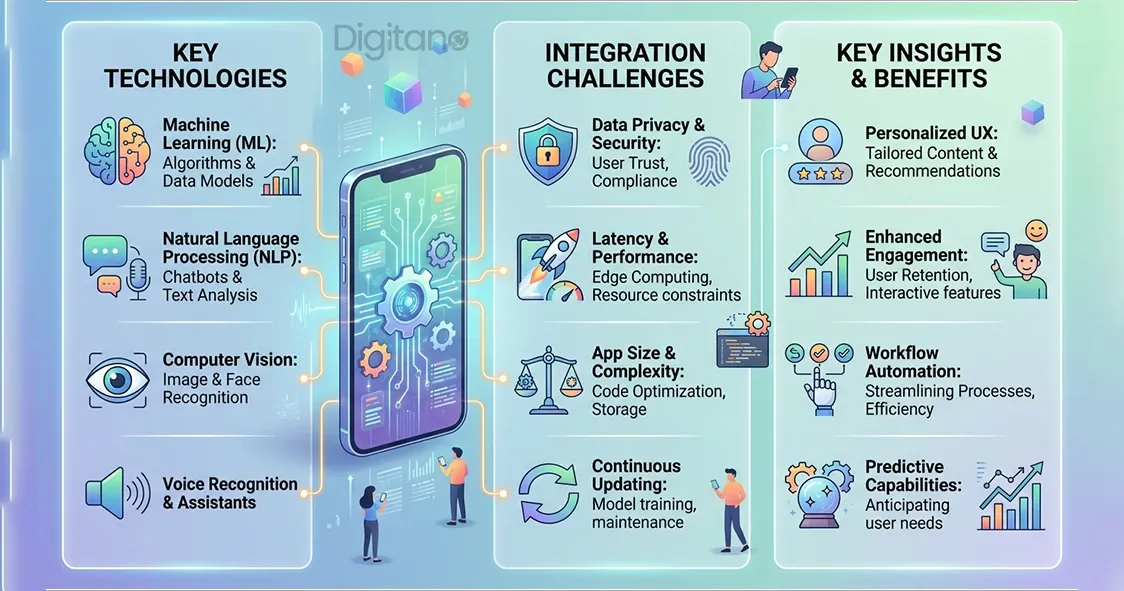
Understanding what's actually under the hood helps you make better decisions about what to build and why. Here are the technologies doing the heavy lifting in 2026.
1. Natural Language Processing (NLP): Your App Finally Speaks Human
NLP is what makes apps understand what users actually mean, not just what they type or say, but the intent behind it.
Think about how different today's chatbots feel compared to the clunky bots of five years ago. Modern NLP-powered assistants understand context, follow multi-turn conversations, handle typos, and even detect tone. They don't just answer questions. They have a conversation.
NLP leads the telehealth AI space with a 32% technology market share, but its impact extends far beyond healthcare. Every voice assistant, smart search bar, auto-reply suggestion, and customer service chatbot in your favorite apps is NLP at work.
Real-world example: Sephora's mobile app uses an NLP-powered chatbot that understands natural beauty queries. A user can type "I need something for dry skin that doesn't break me out" in plain language and get personalized product recommendations. The app doesn't just pattern-match keywords. It understands context and intent, then responds like a knowledgeable friend, not a search engine.
2. Machine Learning & Recommendation Engines:The More You Use It, The Smarter It Gets
Recommendation engines are arguably the most commercially impactful AI technology in mobile apps today. They power what Netflix shows you, what Spotify plays, what Amazon suggests, and what TikTok puts in your feed.
The numbers here are extraordinary. Netflix drives 80% of all content consumption through AI recommendations not search, not browse, but direct AI suggestions. Spotify's AI-driven Discover Weekly has become the single most-used feature on the platform, with users discovering more music algorithmically than through active searching.
The Starbucks app goes even further. It analyzes your purchase history, location, time of day, and even the weather to recommend drinks. On a cold morning, it pushes a hot latte. On a warm afternoon, it suggests an iced drink. The result? A 25% rise in app-based orders and a 10% increase in loyalty program engagement.
This is what machine learning looks like when it's done right. The app stops feeling like a tool. It starts feeling like it knows you.
3. Computer Vision Giving Apps Eyes
Computer vision lets mobile apps see and understand the visual world. Face unlock. Augmented reality filters. Visual product search. Document scanning. Real-time translation of text in a camera feed.
In 2026, computer vision is the leading edge AI use case, with organizations rapidly moving from proof-of-concept to full-scale production deployments.
Real-world example: Snapchat's iconic AR filters, the ones that put dog ears on your face or swap your appearance in real time run entirely on computer vision and facial recognition processed on-device. No lag. No server round trip. The camera sees your face, maps it in real time, and overlays effects in milliseconds. With 302 million installs in the last year alone, Snapchat is proof that computer vision isn't just impressive, it's a retention tool.
Google Lens takes it further still. Point your camera at a plant, a landmark, a piece of text in a foreign language, or a product you want to buy and the app tells you what it is, translates it, or finds it for sale online. That's computer vision combined with NLP, working together in real time.
4. On-Device AI: Processing That Stays on Your Phone
This is the technology shift that doesn't get enough attention, but it's going to define the next decade of mobile apps.
Traditionally, when your app needed AI, it sent your data to a cloud server, got a response, and showed you the result. That created latency, required an internet connection, and raised real privacy concerns your data was leaving your device.
On-device AI changes that. The AI model runs directly on your phone's processor, using Apple's Neural Engine, Qualcomm's AI chips, or similar hardware. No internet required. No round trip to a server. Near-zero latency. And crucially your data never leaves your device.
The on-device AI market was valued at $10.7 billion in 2025 and analysts project it will reach $75.5 billion by 2033. Already, 68% of enterprises plan edge AI deployment by 2026 to cut cloud costs and improve performance.
Four reasons teams are making this switch: speed (cloud round trips add hundreds of milliseconds, breaking real-time experiences), privacy (data that never leaves the device can't be breached), cost (shifting inference to user hardware saves server costs at scale), and availability (local models work without connectivity).
Where AI Is Delivering Real Results in Mobile Apps
Retention and Engagement: The Numbers Are Staggering
The average 30-day retention rate across mobile apps sits around 27%. That means roughly three-quarters of users who download an app are gone within a month. It's one of the most painful problems in the entire industry.
AI is genuinely solving this. Apps with AI-powered recommendation engines report an 86% improvement in customer retention. Apps using AI personalization see up to 62% higher engagement and 80% higher conversion rates than non-AI apps. Users who hit AI-personalized experiences convert at 12.3% compared to just 3.1% on traditional, static flows.
Duolingo is the clearest case study. The language learning app rebuilt its entire product around adaptive AI tutoring lesson difficulty, pacing, content format, and even the mascot's tone all adjust to the individual learner automatically. Their 30-day retention rates lead the category. The AI isn't a feature they added on top. It is the product.
Security: The Silent Hero
Nobody thinks about security until something goes wrong. But AI is doing extraordinary work here, especially in fintech and banking apps.
Fraud detection AI in banking apps now blocks 99.8% of threats in real time. That's not a marginal improvement on rule-based systems, it's a fundamentally different capability. Rule-based systems can only block threats they've been programmed to recognize. AI detects anomalies it's never seen before, identifying patterns that no human analyst would catch in time.
Behavioral biometrics is taking this even further. Apps now analyze how you hold your phone, your typing rhythm, your swipe patterns and build an invisible authentication layer around your unique behavior. If something changes dramatically, the system flags it. Users never notice it's happening, but it creates a security layer that's nearly impossible to spoof.
The Real Challenges What Nobody Puts in the Brochure
Integrating AI into a mobile app sounds clean in pitch decks. In practice, it comes with a set of real challenges that every team building in this space needs to understand.
Latency and performance. Running AI in real time can introduce lag, especially on older or mid-range devices. An AI feature that works beautifully on a flagship phone may frustrate a user on a two-year-old device. Teams must test across real hardware diversity not just development machines and use model compression techniques and edge AI to manage performance.
Model drift. An AI model trained on user behavior from six months ago may be significantly less accurate today. User behavior changes. Market conditions shift. A recommendation engine that was sharp in January may feel stale by July. Teams need monitoring systems to detect when model performance degrades, and pipelines to retrain on fresh data.
Data privacy and compliance. AI systems need data to learn. But 72% of cyber leaders now report heightened data security threats, and regulations like GDPR, CCPA, and India's Digital Personal Data Protection Act impose strict rules on how that data is collected, stored, and used. Getting this wrong doesn't just create legal risk, it destroys user trust, which is far harder to rebuild.
The cold start problem. A new user has no behavioral history. What does your recommendation engine show someone who just downloaded your app five minutes ago? Most AI personalization requires data to work, which means new users often get the worst experience at exactly the moment you most need to impress them. The best teams solve this with smart onboarding, content-based filtering, and demographic signals until behavioral data builds up.
Device fragmentation. Android alone runs on thousands of different hardware configurations. An on-device AI model optimized for one chipset may perform very differently on another. This is particularly challenging for teams targeting global markets where device diversity is highest.
What This Means If You're Building Right Now
If you're a developer, product manager, or business owner working on a mobile app today, here's the practical takeaway.
Start with the user problem, not the technology. The apps failing at AI aren't the ones that built the wrong model. They're the ones that added AI without knowing what specific user problem they were solving. Pick one high-friction point in your user journey, a moment where users drop off, get confused, or feel underserved and apply AI there first.
On-device first where you can. For health apps, finance apps, or anything handling sensitive data, designing for on-device processing isn't just a privacy choice it's increasingly a user expectation. Users in 2026 are more aware of where their data goes than ever before.
Build for retention, not just acquisition. AI's biggest ROI in mobile isn't cutting the cost of acquiring users. It's reducing the rate at which you lose them. A 5% improvement in retention can mean 25–95% improvement in revenue over time. Invest in personalization that genuinely reflects what each user needs, not personalization optimized for engagement at any cost.
Don't skip governance. AI models can develop bias. Recommendation engines can reinforce harmful behavior. Fraud systems can produce false positives that lock legitimate users out of their accounts. Build monitoring, review, and override mechanisms before you need them, not after a problem surfaces in production.
Frequently Asked Questions (FAQs)
Q1: Do I need a large team or a huge budget to integrate AI into my mobile app?
A: Not anymore. Thanks to cloud-based AI APIs (like Google's ML Kit, Apple's Core ML, and OpenAI's API), pre-trained models, and open-source frameworks, teams of all sizes can now integrate AI features without building everything from scratch. A two-person startup can add an NLP chatbot, a basic recommendation engine, or image recognition in weeks, not months. The cost of entry has dropped dramatically. What matters more now is having a clear use case and clean data.
Q2: What is on-device AI and why should app developers care?
A: On-device AI runs machine learning models directly on the user's smartphone, rather than sending data to a cloud server for processing. It matters for three reasons: speed (no network round trip means near-zero latency), privacy (data never leaves the device), and reliability (it works without an internet connection). For apps in health, finance, or any area handling sensitive information, on-device AI is quickly becoming the expected standard, not a premium feature.
Q3: How does AI actually improve user retention in apps?
A: AI improves retention by making the app experience feel personally relevant to each individual user. Instead of showing everyone the same content, layout, or recommendations, AI adapts based on each user's behavior, what they engage with, what they skip, when they use the app, and what they've done in the past. Apps that feel relevant to users get used more. Apps that feel generic get deleted. Data shows AI-powered apps see up to 86% better retention than non-AI alternatives.
Q4: What is model drift and how does it affect my app?
A: Model drift happens when an AI model's accuracy decreases over time because the real world has changed but the model hasn't been updated. For example, a recommendation engine trained on user behavior from a year ago may perform poorly today if user preferences or product catalogs have shifted significantly. The solution is to build monitoring pipelines that track model performance in production and trigger retraining when metrics drop below a defined threshold. This is a maintenance cost that many teams underestimate when first integrating AI.
Q5: How do I handle the "cold start" problem, giving new users good AI experiences before I have their data?
A: The cold start problem is real: new users have no behavioral history for your AI to learn from. The best approaches combine several strategies: use content-based filtering (recommend based on item attributes, not user history), ask a few targeted onboarding questions to establish initial preferences, use demographic or contextual signals (time of day, location, device type), and show a curated "popular" selection until behavioral data builds up. The goal is to make new users feel understood as quickly as possible, even before the model has learned them.
Q6: What are the biggest privacy risks when using AI in mobile apps?
A: The main risks are: collecting more user data than you need (which increases your liability and breach surface), sending sensitive data to cloud servers when on-device processing would work, using AI models that weren't trained on diverse datasets (leading to biased outputs that affect certain user groups unfairly), and failing to give users transparency and control over how their data is used. Regulations like GDPR and CCPA set minimum legal requirements, but the best apps go further giving users clear opt-in choices and explaining in plain language how AI is being used.
Q7: Which industries are seeing the highest ROI from AI in mobile apps?
A: E-commerce and retail lead because personalized recommendations directly increase purchase conversion and order value. Fintech is seeing massive ROI from fraud detection and risk assessment. Healthcare apps are benefiting from predictive monitoring and administrative automation. Education apps like Duolingo are achieving category-leading retention through adaptive learning. Fitness and wellness apps are reducing churn through predictive engagement. The common thread: AI delivers the highest ROI when it directly reduces a specific, measurable problem: churn, fraud, conversion drop-off rather than being added for its own sake.
Q8: How do I measure whether the AI in my app is actually working?
A: Track outcomes, not AI activity. The right metrics depend on your use case, but generally include: retention rate (are users coming back?), session length (are they staying longer?), conversion rate (are they taking the actions you want?), churn rate (are fewer users leaving?), and customer satisfaction scores. Compare these metrics between users who interact heavily with AI features versus those who don't, and between before and after AI implementation. A well-integrated AI feature should show statistically significant improvements in at least one of these areas within the first 90 days.
Q9: Is it worth using generative AI (like an LLM) in a mobile app, or is it overkill for most use cases?
A: It depends entirely on the use case. Generative AI is powerful when users need to create, write, summarize, or have open-ended conversations. It's overkill (and expensive) for tasks that can be solved with simpler models, like basic recommendations, classification, or fraud detection. The honest test: if your user's need can be met by a faster, cheaper, more predictable traditional ML model, use that instead. Save generative AI for cases where the flexibility of open-ended output genuinely adds value that nothing else can match.
Q10: How do I choose between building a custom AI model versus using an existing API?
A: For most teams, start with existing APIs. Google ML Kit, Apple Core ML, OpenAI, Hugging Face, and AWS AI services cover a huge range of capabilities: image recognition, NLP, translation, recommendation, and more without the cost and complexity of custom model training. Build a custom model only when your use case requires data that only you have (like proprietary user behavior patterns) or when an off-the-shelf solution consistently underperforms for your specific context. Custom models take time, expertise, and ongoing maintenance so the use case needs to justify that investment clearly.
Looking Ahead
By the end of 2026, 40% of enterprise apps will feature task-specific AI agents up from less than 5% just a year ago. That's an 8x increase in a single year. Generative AI is projected to jump from the 10th most downloaded app category globally to the 4th by end of year.
The competitive dynamics are clear. Apps with AI personalization see 35% higher retention than traditional apps. AI development delivers 3–10x ROI within 12–18 months for well-executed implementations. And the compounding advantage of starting earlier is real a model trained on six months of user data is significantly more accurate than one running on two weeks, and that accuracy gap compounds over time.
The question for any team still on the fence isn't really "should we integrate AI?" It's "how far behind do we want to fall while we decide?"