
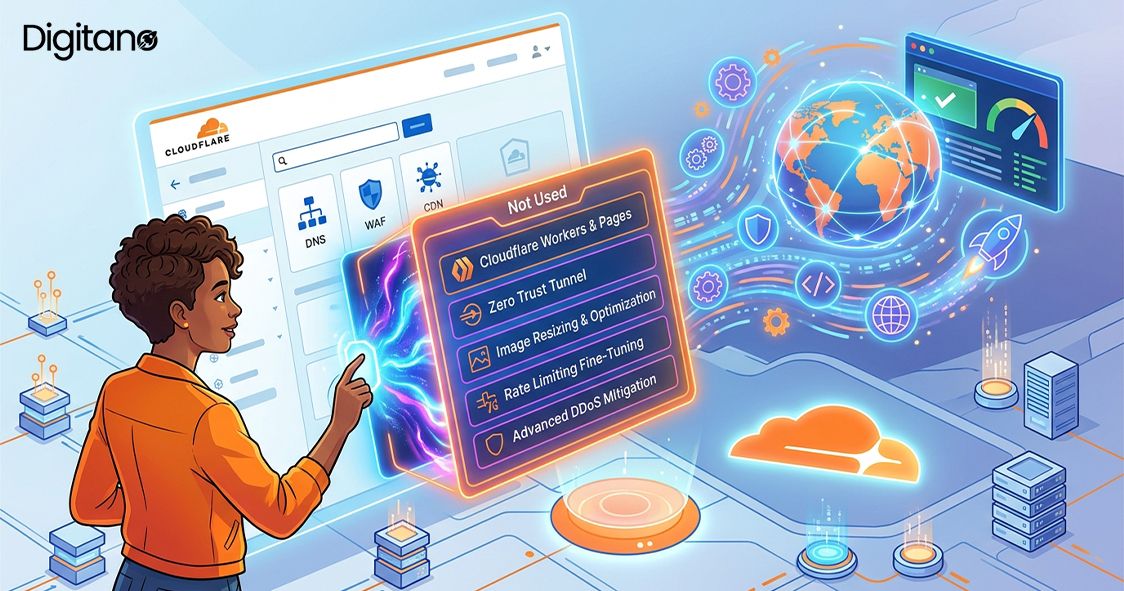
Most people set up Cloudflare the same way. They point their domain at it, turn on the orange cloud, enjoy the free SSL certificate and DDoS protection, and never open the dashboard again. That works, but it is like buying a smartphone and only using it to make calls.
Cloudflare in 2026 is far more than a CDN. Hidden inside that dashboard are free tools that can replace your CAPTCHA service, host your website, store your files without bandwidth bills, give you private email forwarding, run your code around the world, and let you securely access your home server from anywhere, all without opening a single port on your router.
In this guide, we will walk through the best Cloudflare features most users never touch, explain each one in plain words, show what it costs (spoiler: most are free), and tell you exactly why it deserves a place in your setup. At the end, you will find answers to the questions people ask most.
First, Some Quick Facts About Cloudflare in 2026
To understand why these features are worth your time, it helps to know the scale of the network they run on.
- Cloudflare's network spans more than 300 cities in over 120 countries, putting its servers within milliseconds of most internet users on Earth.
- Roughly one in five websites on the internet uses Cloudflare in some form, making it one of the most widely deployed pieces of web infrastructure ever built.
- The network blocks an average of more than 200 billion cyber threats every single day, and that intelligence feeds back into protection for every customer, including free ones.
- Cloudflare Workers, its serverless platform, starts code in under 5 milliseconds thanks to lightweight V8 isolates, far faster than traditional cloud functions that can take seconds to wake up.
- The platform's importance was made painfully clear in November 2025, when a Cloudflare issue briefly took down major platforms, including ChatGPT and several social networks. When Cloudflare sneezes, the internet catches a cold.
Now let's look at the features sitting unused in your account.
Why Do So Many Features Go Unused?
There are three honest reasons. First, Cloudflare's onboarding focuses on the basics: DNS, SSL, and caching. Once those work, most people stop exploring. Second, the dashboard has grown enormously; what started as a handful of tabs is now dozens of products, and nobody reads dozens of tabs. Third, many of these tools sound like they are only for big companies or full-time developers, when in reality a blogger, a freelancer, or a one-person shop can use almost all of them with no code at all.
The result is millions of accounts paying (often nothing) for one feature while nine others sit idle. Let's fix that, one feature at a time.
Quick Overview: The Features and What They Replace

1. Cloudflare Tunnel: Access Your Server Without Opening Ports
This might be the most underrated free tool on the internet. Cloudflare Tunnel creates a secure, outbound-only connection from any machine, your home server, a Raspberry Pi, or your office NAS to Cloudflare's network. Visitors reach it through your domain, but your machine never exposes a single port to the open internet.
Why does that matter? Because the old way, port forwarding on your router, puts your home IP address on display and gives attackers a door to knock on. With a tunnel, there is no door. Your server only talks outward to Cloudflare, and Cloudflare handles the rest, including SSL.
People use tunnels to self-host media servers, dashboards, dev environments, and internal tools safely. Setup takes about ten minutes with one small program called cloudflared, and it costs nothing. If you self-host anything at all, this feature alone justifies the article.
2. Turnstile: The CAPTCHA That Doesn't Hate Your Users
Every CAPTCHA puzzle you force on a visitor costs you conversions. Studies on form abandonment have long shown that friction at the final step drives real numbers of people away, and nothing says friction like clicking blurry traffic lights three times.
Turnstile is Cloudflare's free replacement. It verifies that a visitor is human using invisible browser signals, no puzzles, no image grids, and usually no interaction at all. Visitors see a brief checkmark and move on. It is also privacy-friendly: unlike some alternatives, it does not harvest user data for advertising purposes.
Adding it takes a small code snippet, and it works on any website, even ones not proxied through Cloudflare. If your contact form, login page, or signup flow still runs an old-school CAPTCHA in 2026, you are paying a silent tax in lost users.
3. Email Routing: Free Custom-Domain Email Forwarding
Want hello@yourdomain.com without paying for a mail service? Email Routing forwards mail sent to addresses on your domain straight to your existing inbox, Gmail, Outlook, or anything, for free, with unlimited addresses.
The killer trick is the catch-all rule. Enable it, and anything@yourdomain.com reaches you. That lets you give every service a unique address: netflix@yourdomain.com, bank@yourdomain.com, and newsletter@yourdomain.com. If one address starts receiving spam, you know exactly who leaked or sold your data, and you can block just that address while the rest keep working.
For small businesses, it also means every team alias (support@, sales@, and billing@) can route to the right person's personal inbox without buying mailboxes for each one.
4. R2 Storage: Object Storage Without the Bandwidth Bill
If you have ever used Amazon S3, you know the pain is not storage cost; it is egress: the fee charged every time someone downloads your files. For sites serving images, videos, backups, or software downloads, egress fees can dwarf everything else on the bill.
Cloudflare R2 is S3-compatible object storage with zero egress fees. You pay modest storage rates (with a free tier of 10 GB) and nothing at all when files are downloaded, no matter how many millions of times. Because it speaks the S3 API, most existing tools and code work with R2 after changing a few configuration lines.
For anyone serving public files at scale, the math is brutal in R2's favor. Companies have reported cutting their storage bills by 80 to 90 percent simply by moving frequently downloaded files from S3 to R2.
5. Workers: Run Code in 300+ Cities Without a Server
Cloudflare Workers lets you run JavaScript or TypeScript on Cloudflare's edge network, meaning your code executes in the city nearest to each visitor. Cold starts take under 5 milliseconds, so there is none of the multi-second wake-up lag older serverless platforms suffer from.
What is it good for? Small APIs, redirect logic, A/B testing, modifying HTML on the fly, form handlers, webhooks, URL shorteners, and gluing services together. Paired with Workers KV (a key-value store) and D1 (a serverless SQL database), you can build entire applications with no server to manage at all.
The free plan includes 100,000 requests per day, which comfortably covers most personal projects and small business tools. Paid plans start at just $5 per month. In 2026, with AI features like Workers AI added on top, this has quietly become one of the most capable developer platforms anywhere, and most Cloudflare users have never deployed a single Worker.
6. Pages: Free Website Hosting With Unlimited Bandwidth
Cloudflare Pages hosts static websites and modern frontend frameworks (Next.js, Astro, Hugo, plain HTML, and more) for free, with unlimited bandwidth. Connect your GitHub or GitLab repository, and every push automatically builds and deploys your site globally. You also get free preview deployments for every branch, so you can review changes at a private URL before they go live.
The free tier includes 500 builds per month, custom domains, and automatic SSL. Compare that to paying for shared hosting, or to platforms that charge once your traffic grows, and the value is obvious. For blogs, portfolios, documentation, landing pages, and marketing sites, Pages is genuinely hard to beat at any price, let alone free.
7. Web Analytics: Know Your Traffic Without Spying on Visitors
Google Analytics is powerful but heavy, complicated, and increasingly tangled in privacy regulations. Cloudflare Web Analytics is the opposite: a free, lightweight, privacy-first alternative that shows you the essentials, page views, visits, top pages, referrers, countries, and Core Web Vitals, without cookies and without tracking individual users.
Because it does not use cookies, in many cases you do not need a consent banner just for analytics, which keeps your site cleaner and faster. If your site is proxied through Cloudflare, the data is collected at the network edge, meaning it even counts visitors who block JavaScript trackers, numbers ad-blocker-blind tools never see.
It will not replace deep marketing funnels, but for the question most site owners actually have, "How many people visited and what did they read?" it answers perfectly, for free.
8. Cache Rules, Redirect Rules, and Configuration Rules
Old-timers remember Page Rules, the limited, clunky way to customize Cloudflare per URL. In 2026, the modern rules engine has replaced them, and it is dramatically more powerful, yet most accounts still run on defaults.
- Cache Rules let you tell Cloudflare exactly what to cache and for how long. Caching aggressively can cut the requests reaching your origin server by half or more, which means lower hosting costs and faster pages simultaneously.
- Redirect Rules handle www-to-root redirects, moved pages, and country-based routing at the edge, faster than redirects done by your server and with no plugins required.
- Configuration Rules switch features like security level or Rocket Loader on and off for specific paths, for example, relaxing settings on your API while keeping them strict on your login page.
Spending thirty minutes here is one of the highest-return performance tasks available to any site owner, and the free plan includes a healthy number of rules of each type.
9. Bot Fight Mode and Security Extras You Haven't Switched On
A large share of internet traffic is bots, and not the friendly kind. Bot Fight Mode, available even on the free plan, challenges known malicious bots automatically, cutting scraping, comment spam, and credential-stuffing attempts before they touch your server.
While you are in the security tab, check two more switches people forget: the security level setting and hotlink protection, which stops other websites from embedding your images and quietly burning your bandwidth. On paid plans, Super Bot Fight Mode and Page Shield (which watches for malicious scripts in your pages) take this further, but the free defaults alone block a remarkable amount of junk once enabled.
10. Zero Trust Access: A VPN Replacement for Small Teams, Free
Cloudflare Zero Trust lets you put a login wall in front of any application, your staging site, admin dashboard, internal wiki, or that tunnel from feature #1 and control exactly who gets in, verified by their identity (Google login, email code, and more) rather than by network location.
This is the modern replacement for the clunky office VPN, and Cloudflare's plan is free for up to 50 users. A small agency can protect every client staging site behind team logins, a family can protect a home media server, and a startup can secure internal tools, all without buying or maintaining VPN infrastructure.
Combined with Tunnel, you get something remarkable: services running on hardware in your house, reachable securely from anywhere in the world, protected by enterprise-grade access control, for a grand total of zero dollars.
How to Start: A Simple 30-Minute Checklist
You do not need to adopt everything at once. Here is a practical order that delivers the most value fastest.
- Minutes 0–10: Turn on Bot Fight Mode and hotlink protection and set up Email Routing with a catch-all address. Three switches, instant value.
- Minute 10–20: Replace your CAPTCHA with Turnstile on your most important form.
- Minute 20–30: Add the Web Analytics snippet and create one Cache Rule for your static assets.
- This weekend: Set up a Cloudflare tunnel to something you self-host and put Zero Trust Access in front of it. Once you experience it, you will never forward a port again.
- Next project: Host it on Pages, store its files in R2, and handle its backend logic with a Worker. Total monthly cost for a small project: usually $0.
Free vs Paid: When Does Upgrading Make Sense?
Everything in this article works on the free plan, and for most personal sites and small businesses, free is genuinely enough. The Pro plan at $25 per month per site mainly adds image optimization (Polish and Mirage), a managed Web Application Firewall ruleset, and Super Bot Fight Mode. The Business plan at $250 per month adds features like custom SSL, advanced bot controls, and Page Shield.
A simple rule of thumb for 2026: upgrade when a specific problem demands it, not before. Heavy image traffic that needs automatic compression? Pro starts paying for itself. An online store under bot attack? The advanced security tiers earn their keep. Until you hit a problem like that, master the free features first; the platform rewards careful configuration far more than it rewards a bigger bill.
Frequently Asked Questions (FAQs)
Q1: Are these Cloudflare features really free, or is there a catch?
A: Most are genuinely free: Tunnel, Turnstile, Email Routing, Web Analytics, Bot Fight Mode, Pages (500 builds/month), Workers (100,000 requests/day), and Zero Trust for up to 50 users. The business model is simple: Cloudflare gives generous free tiers to individuals and small sites and earns money from large enterprises. You are not the product; you are the on-ramp.
Q2. What is the difference between Cloudflare R2 and Amazon S3?
A: They do the same job, object storage, and R2 even uses the S3-compatible API, so most tools work with both. The big difference is cost: S3 charges egress fees every time a file is downloaded, while R2 charges zero egress. For frequently downloaded files, R2 can cut bills by 80 to 90 percent.
Q3: Is Cloudflare Tunnel safe for exposing my home server?
A: It is far safer than the alternative. Traditional port forwarding exposes your home IP and an open port to the whole internet. A tunnel makes only outbound connections, so nothing is exposed; visitors reach you through Cloudflare, which adds SSL and DDoS protection. Pair it with Zero Trust Access for a login wall and you have enterprise-style security at home.
Q4: Can Turnstile fully replace Google reCAPTCHA?
A: Yes, for most websites. Turnstile verifies humans invisibly without puzzles; works on any site, supports the same use cases (forms, logins, and signups); and is free. Many platforms and plugins added native Turnstile support in 2024–2026, so switching is usually a configuration change rather than a rebuild.
Q5: Can I send email with Cloudflare Email Routing, or only receive?
A: Email Routing is primarily for receiving and forwarding. To send from your custom address, the common setup is forwarding incoming mail to Gmail or Outlook, then configuring that provider to send as your custom address. For application emails (receipts, notifications), developers typically pair a Worker with a sending service.
Q6: Do Cloudflare Workers replace a real server?
A: For many things, yes. APIs, form handlers, redirects, webhooks, and small apps run beautifully on Workers, especially with KV and D1 for data. They have limits on memory and execution time, so heavy compute jobs, long-running processes, and large applications still belong on traditional servers or containers. Think of Workers as replacing the small servers, not the big ones.
Q7: Does the November 2025 Cloudflare outage mean I should avoid it?
A: It is a fair concern; that incident briefly affected major platforms like ChatGPT. But every provider has outages, and Cloudflare's overall record across 300+ cities remains strong. The sensible lesson is resilience: keep backups of your DNS settings, know your recovery steps, and for truly critical systems, plan redundancy. For the vast majority of sites, Cloudflare adds far more uptime than it risks.
Q8: Which feature should I try first in 2026?
A: If you self-host anything, start with Cloudflare Tunnel; it changes how you think about servers. If you run a business website, start with Turnstile and Cache Rules for immediate conversion and speed wins. If you are a developer, deploy your first Worker; the free 100,000 requests per day are enough for almost any side project.
Final Thoughts
Cloudflare's free plan is famous, but most people use perhaps ten percent of it. The other ninety percent, tunnels, Turnstile, email routing, R2, Workers, Pages, analytics, modern rules, and Zero Trust, can replace hundreds of dollars per year in separate services while making your sites faster and safer at the same time.
The common thread in 2026 is that Cloudflare has quietly grown from a CDN into a full platform, and the features above are mature, stable, and battle-tested on one of the largest networks on Earth. The only thing missing is people actually switching them on. Open your dashboard this week, pick one feature from this list, and try it. The first ten minutes are usually all it takes to get hooked.