Imagine paying for electricity even when every light in your house is off. That is how traditional servers work: you rent them by the hour, and you pay whether they are busy or sitting idle. For most applications, servers sit idle most of the time, which means most of your cloud bill buys nothing.
AWS Lambda flips that model. You upload your code, and it runs only when something triggers it: a user request, a file upload, a scheduled task. You pay for the exact milliseconds your code runs, and not one millisecond more. No servers to set up, patch, or babysit. This approach is called serverless computing, and Lambda, launched by Amazon back in 2014, is the platform that made it famous.
In 2026, serverless is no longer a buzzword; it is how a huge share of modern applications run. In this article, we will explain what AWS Lambda is in simple words, share the latest facts and figures, and walk through the 10 biggest benefits it brings to cloud computing. At the end, you will find clear answers to the most common questions.
What Is AWS Lambda, in Simple Words?
AWS Lambda is a service that runs your code without you managing any servers. You write a small piece of code, called a function, and tell Lambda what should trigger it. A trigger can be almost anything: a web request, a new file landing in storage, a new row in a database, a message in a queue, or a timer that fires every hour.
When the trigger happens, Lambda instantly spins up an environment, runs your function, and shuts it down when finished. If one user triggers it, one copy runs. If a million users trigger it at the same moment, Lambda runs as many copies as needed, automatically. You never click a button to add servers, and you never pay for quiet periods.
Lambda supports the languages most teams already use, including Node.js, Python, Java, C#, Go, and Ruby, plus custom runtimes for anything else.
The 2026 Facts and Figures Behind Lambda's Rise
• The global serverless computing market reached $26.33 billion in 2025 and is projected to grow to $116.58 billion by 2033, a compound annual growth rate of 20.6%.
• AWS has reported that more than 1.5 million customers use Lambda every month, together invoking functions tens of trillions of times per month.
• According to Datadog's serverless research, Lambda usage has at times grown by more than 100% year over year as enterprises move microservices to serverless.
• Function-as-a-Service (FaaS), the category Lambda leads, accounted for roughly 65% of the entire serverless market in 2024.
• AWS states that businesses can save up to 70% by switching spiky, unpredictable workloads from always-on servers to Lambda.
• Lambda keeps evolving fast: 2025–2026 brought Managed Instances (announced January 2026), SnapStart 2.0 with up to 90% faster cold starts for Java and .NET, and a doubled scaling rate of 1,000 new function instances every 10 seconds.
In short: the platform is enormous, growing, and improving. Now let's get to the reasons you would actually use it.

The 10 Benefits at a Glance
1. You Pay Only for What You Use
This is the benefit that sells everyone first. Lambda bills you per request and per millisecond of compute time. The price is tiny: $0.20 per million requests, plus a small charge based on memory and duration. When nothing runs, you pay nothing.
Compare that to a traditional server: even a modest cloud server costs money 24 hours a day, including the 3 a.m. hours when nobody visits your app. AWS itself reports that moving spiky workloads from always-on instances to Lambda can cut compute costs by up to 70%. For startups, internal tools, and any application with quiet periods, the savings are not theoretical; they show up on the very first bill.
2. No Servers to Manage, Ever
With Lambda, an entire category of work simply disappears. There are no operating systems to patch, no security updates to schedule, no disks filling up, no capacity planning meetings, and no 2 a.m. pages because a server fell over. AWS handles all of it underneath.
This matters more than it sounds. Engineering time is the most expensive resource most companies have. Every hour your developers spend nursing infrastructure is an hour not spent building features customers pay for. Serverless moves that burden to AWS, whose teams manage servers at a scale and skill level almost no company can match internally.
3. Automatic Scaling, Both Up and Down
Traffic is never flat. A marketing email lands, a product goes viral, a sale starts, and suddenly your traffic is twenty times normal. With traditional servers, you either over-provision (and waste money every normal day) or under-provision (and crash on your best day).
Lambda removes the choice. It scales instantly and automatically, running as many copies of your function as incoming events demand, then scaling back to zero when things calm down. Serverless platforms routinely absorb sudden 10x to 50x spikes without any manual action, and Lambda's scaling rate was recently doubled to 1,000 new instances every 10 seconds per function, so even violent bursts get handled gracefully.
4. Faster Time to Market
Because there is no infrastructure to design, order, and configure, the path from idea to running code gets dramatically shorter. A developer can write a function in the morning and have it live, scaled, and monitored by the afternoon.
This speed compounds. Teams using Lambda typically ship smaller pieces more often, test ideas cheaply, and throw away experiments that fail without having wasted money on infrastructure. In competitive markets, the company that iterates fastest usually wins, and removing server setup from every project is one of the easiest speed boosts available in cloud computing today.
5. Built-In High Availability and Fault Tolerance
Keeping a traditional application running when a data center has a bad day requires serious engineering: multiple servers, load balancers, health checks, and failover plans. Lambda gives you the equivalent by default. Functions automatically run across multiple availability zones, separate physical data centers, so the failure of one zone does not take your application down.
You get the kind of resilience that used to require a dedicated infrastructure team, included in the price of every function, with no configuration required.
6. A Genuinely Generous Free Tier
Lambda's free tier includes 1 million requests and 400,000 GB-seconds of compute every single month, and unlike many cloud trials, it never expires. That is enough to run real applications, a startup MVP, a side project, a small business's automation, entirely free, indefinitely.
This makes Lambda one of the cheapest ways in existence to learn cloud computing or validate a business idea. Many small production systems live their whole lives inside the free tier and never generate a compute bill at all.
7. Deep Integration With the AWS Ecosystem
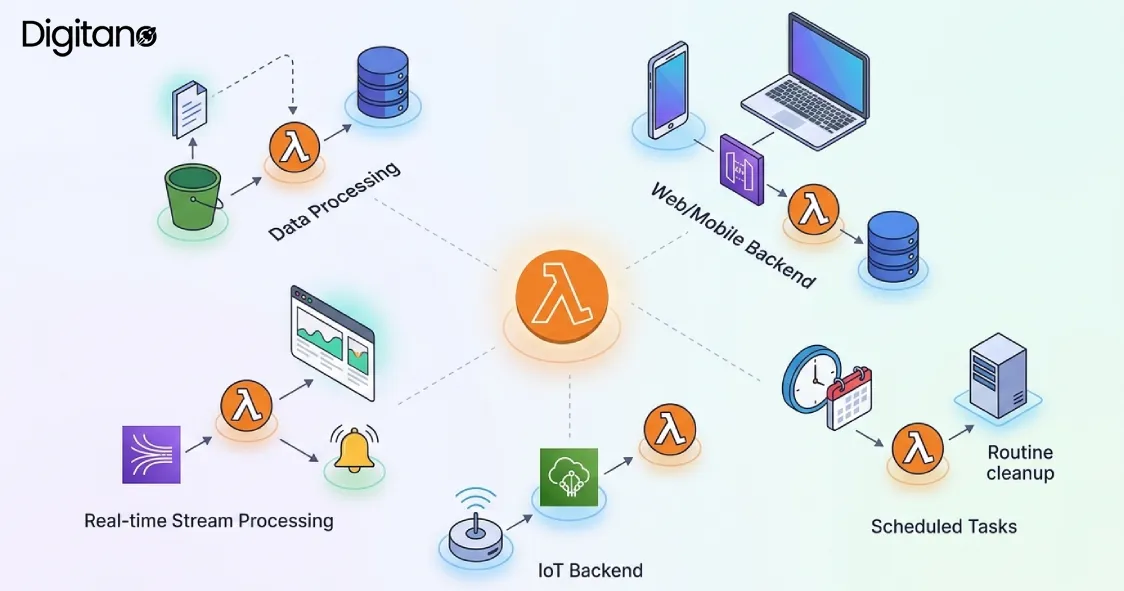
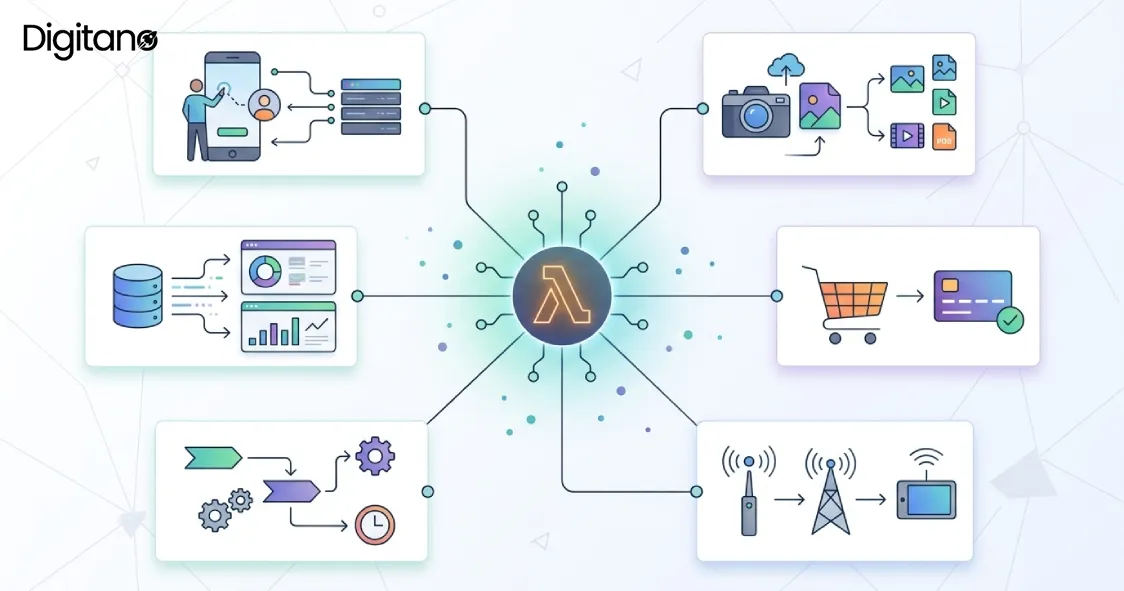
Lambda's superpower is that it plugs natively into the rest of AWS. A file uploaded to S3 can trigger a function that resizes it. A new record in DynamoDB can trigger a function that sends a notification. API Gateway can turn functions into a full web API. EventBridge can run functions on schedules. SQS queues can feed them work at a controlled pace.
This event-driven style lets you assemble sophisticated systems, data pipelines, image processors, chatbots, IoT backends, like Lego blocks, with Lambda as the glue. No other compute service connects to as many AWS services with as little code.
8. Strong Security Built Into the Model
Every Lambda function runs in its own isolated environment, and each one gets its own fine-grained permissions through AWS IAM. A function that only needs to read one storage bucket can be given exactly that permission and nothing more, which sharply limits the damage if anything is ever compromised.
On top of that, the patching problem, the cause of countless real-world breaches, largely disappears, because AWS keeps the underlying runtimes and operating systems updated for you. Recent additions like Tenant Isolation Mode (introduced for multi-tenant SaaS applications) push this even further for companies serving many customers from one codebase.
9. Flexibility in Languages and Tools
Lambda does not force a technology choice on your team. It officially supports Node.js, Python, Java, C#, Go, and Ruby, and custom runtimes open the door to nearly anything else. Container image support means you can package functions with the exact dependencies you need.
Mature tooling has grown around it too: AWS SAM and the Serverless Framework define your functions as code, CDK lets you build infrastructure in real programming languages, and CI/CD integration is well-trodden. In 2026, building on Lambda feels like working with a mature platform, not a science experiment.
10. A Platform That Keeps Getting Better
Choosing technology is also a bet on its future, and Lambda's recent trajectory is reassuring. The 2025–2026 wave of updates addressed its historical weak spots head-on: SnapStart 2.0 cut cold start delays by up to 90% for Java and .NET functions; Managed Instances (January 2026) blend EC2-class compute, now up to 32 GB of memory and 16 vCPUs, with serverless simplicity; response streaming reached all commercial regions; and new MCP server support connects Lambda functions to AI agents.
The direction is clear: AWS is investing to make Lambda suitable for workloads that used to be off-limits, including latency-sensitive fintech, gaming backends, and AI-powered applications. Skills and systems built on Lambda today are positioned well for what comes next.
Real-World Use Cases: What People Actually Build With Lambda
Benefits are easier to feel through examples. Here are common patterns running on Lambda in production today.
• Photo and video processing: A user uploads an image to S3, which triggers a function that creates thumbnails, compresses the file, and stores the results. No server waits around between uploads; the work happens only when an upload happens.
• Web and mobile backends: API Gateway receives requests and routes each one to a function. A startup can serve its first user and its millionth user on the same architecture without re-engineering anything.
• Scheduled automation: Nightly database backups, weekly report emails, hourly data syncs, jobs that used to need a server running 24/7 just to work a few minutes a day now run as scheduled functions and cost pennies.
• Real-time data pipelines: Streams of events from apps, websites, or IoT devices flow through services like Kinesis and SQS into functions that clean, enrich, and store the data the moment it arrives.
• Chatbots and AI workflows: Functions handle webhook calls from messaging platforms, call AI models, and reply, scaling effortlessly when a bot suddenly gets popular. With 2026's MCP support, Lambda functions can now act as tools for AI agents directly.
How Lambda Pricing Works (With a Simple Example)
Lambda charges two things: $0.20 per million requests, and a duration charge based on memory size and runtime, billed per millisecond. Let's make that concrete.
Say your API function uses 512 MB of memory, runs for an average of 100 milliseconds, and handles 3 million requests per month. The first million requests are free; the remaining 2 million cost $0.40. The compute works out to roughly 150,000 GB-seconds, and after the 400,000 free GB-seconds, the compute charge is zero. Your total monthly bill: about $0.40 for an API serving 3 million requests.
The same workload on even a small always-on server would cost many times more, plus the time spent managing it. This is why the pay-per-use model is not a marketing line; for typical bursty applications, it is simply a different and smaller number at the bottom of the invoice.
Where Lambda Is Not the Right Tool (Honest Talk)
No technology is perfect, and a fair article should say so. Lambda functions have execution time limits, so very long-running jobs belong elsewhere. Rarely used functions can suffer cold starts, a short delay while the environment warms up, though SnapStart and provisioned concurrency have shrunk this problem considerably. Costs can also surprise you at extremely high, constant traffic, where an always-busy server is sometimes cheaper. And building deeply on Lambda does tie you to the AWS ecosystem.
The simple rule: Lambda shines for event-driven, bursty, or unpredictable workloads. Constant, heavy, long-running compute may still belong on containers or traditional instances, and the best architectures in 2026 happily mix both.
Quick Tips to Get the Most Out of Lambda in 2026
• Keep functions small and focused: One function, one job. Small functions start faster, cost less, and are far easier to test and debug.
• Right-size your memory: More memory also means more CPU, so a higher memory setting sometimes finishes so much faster that it costs less overall. Test a few sizes instead of guessing.
• Use queues for heavy work: Never make a user's request wait on a long task. Accept the request, drop the job into a queue like SQS, and let another function process it in the background.
• Watch your logs and metrics: CloudWatch shows duration, errors, and cost per function. Ten minutes a week reviewing it catches expensive mistakes early.
• Start in the free tier: Build your first real project without spending a cent, and let actual usage data, not fear, decide your architecture.
Frequently Asked Questions (FAQs)
Q1: What is AWS Lambda in simple terms?
A: AWS Lambda is a service that runs your code only when needed, without you managing any servers. You upload a function, choose what triggers it (like a web request or file upload), and AWS handles everything else, including scaling. You pay only for the milliseconds your code actually runs.
Q2: Is AWS Lambda really cheaper than a normal server?
A: For workloads with idle time or unpredictable traffic, usually yes; AWS reports savings of up to 70% for spiky workloads moved from always-on servers. For applications with constant, heavy, around-the-clock traffic, a traditional server can sometimes be cheaper. The free tier of 1 million monthly requests also means small projects often pay nothing at all.
Q3: What are cold starts, and are they still a problem in 2026?
A: A cold start is a short delay when Lambda prepares a fresh environment for a function that has not run recently. It is far less of a problem than it used to be: SnapStart 2.0 improved cold starts by up to 90% for Java and .NET, and provisioned concurrency keeps functions pre-warmed for latency-critical applications.
Q4: What programming languages does AWS Lambda support?
A: Lambda officially supports Node.js, Python, Java, C#, Go, and Ruby. Through custom runtimes and container images, you can run virtually any language. Python and Node.js remain the most popular choices because of their fast startup times and rich ecosystems.
Q5: What is AWS Lambda commonly used for?
A: Popular uses include web and mobile API backends, processing files the moment they are uploaded, real-time data pipelines, chatbots, scheduled tasks and automation, IoT event handling, and gluing AWS services together. Increasingly in 2026, it also powers AI-driven workflows and agent integrations.
Q6: How big can a Lambda function be in terms of power?
A: Standard functions can be configured with up to 10 GB of memory, with CPU allocated proportionally. The new Managed Instances capability, introduced in January 2026, extends serverless operation to larger compute with up to 32 GB of memory and 16 vCPUs for heavier workloads.
Q7: Does using Lambda lock me into AWS?
A: Partly. Your business logic is just code in a standard language, which moves easily. But the triggers, permissions, and surrounding services are AWS-specific, so a migration would require rework. Using frameworks like the Serverless Framework or AWS SAM, and keeping business logic separated from AWS-specific code, reduces the lock-in risk.
Q8: Is serverless computing the future of the cloud?
A: The trend strongly suggests it is a major part of it. The serverless market is growing at over 20% per year toward a projected $116.58 billion by 2033, FaaS already makes up about 65% of that market, and every major cloud provider keeps investing heavily. Traditional servers and containers are not disappearing, but serverless has become a default choice for new event-driven applications.
Final Thoughts
AWS Lambda changed what cloud computing means. Instead of renting computers and hoping you sized them right, you hand AWS your code and pay only for the moments it actually runs. The benefits stack up quickly: lower bills, zero server maintenance, instant scaling, faster shipping, built-in resilience, and a security model that closes whole categories of risk.
The numbers say the industry agrees, a market headed from $26 billion to over $116 billion, more than 1.5 million monthly Lambda customers, and trillions of monthly invocations. If you have a workload that sits idle between bursts of activity, or a team spending too much time on servers instead of software, 2026 is a very good year to give Lambda a serious look. The free tier means trying it costs you exactly nothing.